Configuring a deployment server
The applications deployed with PowerClient will be installed and
updated through a Web server. Therefore, you will need to configure a
Web server for deployment.
To configure a deployment server:
-
Set up a Web server according to the documents provided by
the vendor.Any type of Web server (such as IIS, Apache, Nginx etc.) is
supported. You can set up FTP on the server, so that you can
remotely deploy the app to the server. For how to configure FTP on
a server running against IIS, refer to Configure
an FTP server. For how to configure SSL on a server running
against IIS, refer to Configure
an SSL-based FTP server. -
Select Tools>Web Server Profile from the menu bar to
open the Web Server Profile
window.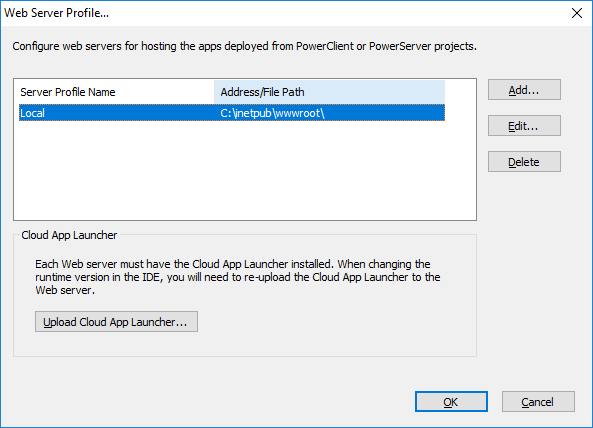
-
In the Web Server Profile
window, click Add to configure a
local or remote Web server where the application will be
deployed.-
To configure a local Web server, select the Local Server button and specify the Web
root of the Web server (for example
%systemdrive%inetpubwwwroot for IIS) or a subdirectory under
the Web root. Click Test File
Path to make sure the specified path is valid for
deployment.Note
If you intend to deploy to a local Web server, make
sure you run PowerBuilder as administrator or have the read
and write permissions to the specified directory (read and
write permissions are required when transferring files to
the Web server). -
To configure a remote Web server, select the Remote Server button. You will need to
specify the profile name and the following FTP settings: host
name, port number, user name, password, and encryption
settings. Click Test FTP
Connection to make sure the specified settings are
correct for deployment. The FTP user must have the read and
write permissions in order to transfer files to the FTP server
successfully.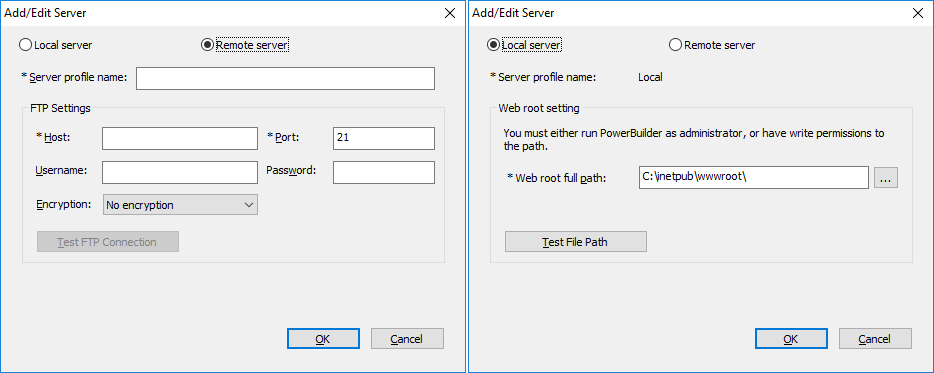
The server configuration will be used by all PowerClient
projects; therefore if you have changed the server settings, you
will need to upload the app launcher if no launcher has been
uploaded to that server or directory.Note
If you intend to deploy to the Web server through a proxy
server, make sure the proxy server and the FTP server have the
same encoding, otherwise, the multi-byte characters in the
file/folder name will become unrecognizable after deployed to
the server.Note
As PowerBuilder is designed to be case-insensitive,
therefore, in a case-sensitive system like Linux, some app files
(such as images) may not be found or loaded. To avoid any issue
caused by the case of file name, make sure to configure the
Linux server to ignore case-sensitive. -