Components of an ODBC connection
How an ODBC connection is
made
When you access an ODBC data source in PowerBuilder, your
connection goes through several layers before reaching the data source.
It is important to understand that each layer represents a separate
component of the connection, and that each component might come from a
different vendor.
Because ODBC is a standard API, PowerBuilder uses the same
interface to access every ODBC data source. As long as a driver is ODBC
compliant, PowerBuilder can access it through the ODBC interface to the
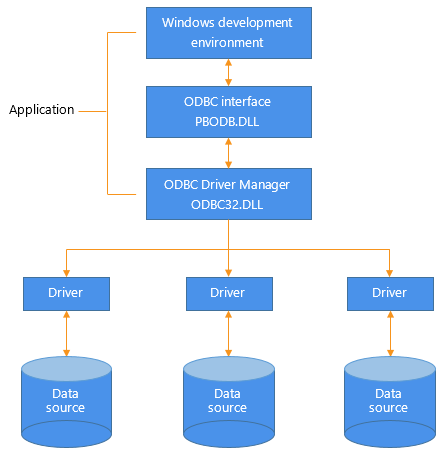
ODBC Driver Manager. The development environment and the ODBC interface
work together as the application component.
The following figure shows the general components of an ODBC
connection.
Figure: Components of an ODBC connection
Component descriptions
The following table gives the provider and a brief description of
each ODBC component shown in the diagram.
|
Component |
Provider |
What it does |
|---|---|---|
|
Application |
SAP |
Calls ODBC functions to submit SQL statements, PowerBuilder uses the same ODBC interface to |
|
ODBC Driver Manager |
Microsoft |
Installs, loads, and unloads drivers for an |
|
Driver |
Driver vendor |
Processes ODBC function calls, submits SQL requests If necessary, translates an |
|
Data source |
DBMS or database vendor |
Stores and manages data for an application. |