Compare objects
You can compare an object in your local directory with the
version of the object that was last synchronized with the source
control server. If the object you want to compare has not been added
to the source control server, or the local object is not changed since
last sync, the Git Diff menu item is not available.
PowerBuilder IDE provides no difference utility, but it allows
you to select one that you have already installed. Please make sure
the utility itself is compatible with Git client 2.0 or later. The
recommended utilities and versions are:
-
TortoiseGit 2.6.0.0
-
Araxis Merge 2018.4988
-
Beyond Compare 4.2.4
-
DiffMerge 4.2.0
-
ExamDiff Pro 9.0.1.8
-
KDiff3 0.9.98
-
SemanticMerge 2.0.120.0
-
UltraCompare 18.00.0.47
-
WinMerge 2.14.0.0
To select a utility for object comparison:
-
Right-click the workspace in the System Tree and select
Properties from the pop-up menu. -
In the Properties of Workspace dialog box, select the Source
Control tab, and then click the Advanced button. -
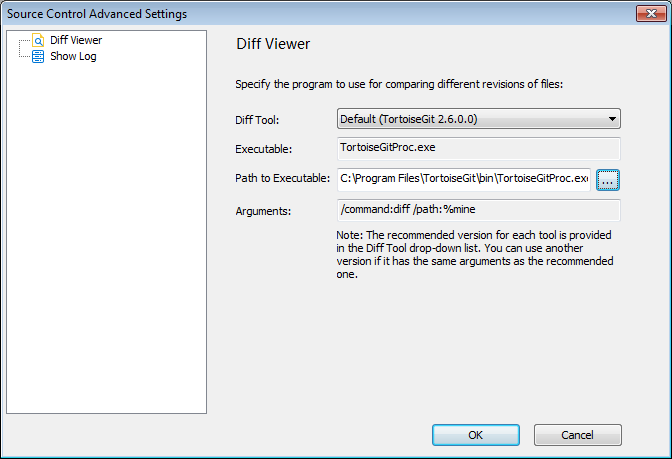
In the Source Control Advanced Settings dialog box, select
Diff Viewer in the left panel, then select the tool name from the
list, specify the executable program of the tool, and change the
arguments if necessary. -
Click OK.
Method 1: To compare the local object with the version last
sync with source control:
-
Right-click the object in the System Tree and select Git
Diff from the pop-up menu.The difference utility displays the objects directly.
Method 2: To compare the local object with the version last
sync with source control:
-
Right-click the object in the System Tree and select Git
Commit (Revert, or Resolve) from the pop-up menu. -
In the Git Commit (Revert, or Resolve) dialog, double click
an item from the object list to view the differences.You can view the differences of the item which is added,
modified, locked, or conflicted (but not deleted).The difference utility displays the objects and highlights
the differences directly.
You can also compare the workspace file (.pbw) by right-clicking
the workspace and selecting Git Diff, or compare the target file
(.pbt) by right-clicking the target and selecting Git Diff, but you
cannot compare the binary file such as the library file (.pbl).