Change
the size of the main window
Where you are
Specify an icon for
the application
> Change the size
of the main window
Now you change the size of the application’s main window. When you
run the application, the main window displays in the position and size
that you specify.
-
Double-click w_pbtutor_frame in the System Tree.
The Window painter opens the application’s frame window.
-
Check the Center check box on the General page in the Properties
view.Now when you run the application, the frame window will be
centered. -
Scroll down and select normal! in the WindowState drop-down list
box.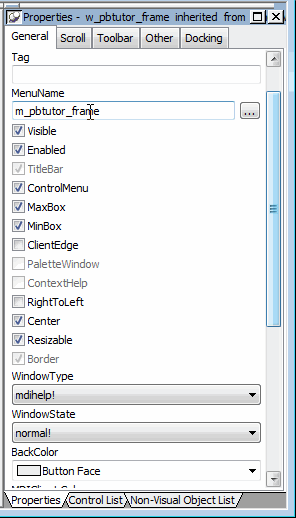
If your Properties view looks different
You can change the position of Properties view labels by
right-clicking the Properties view and selecting a preference from
the pop-up menu. You can position the labels either to the left of
all fields, or on top of the text fields and to the right of the
check boxes. -
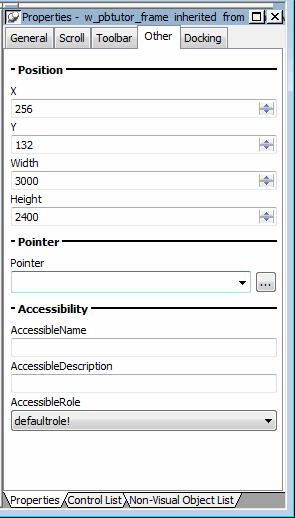
Click the Other tab in the Properties view.
-
Type 3000 in the Width text box and 2400 in the Height text
box.The size of the window rectangle in the Layout view changes. The
values you type are in PowerBuilder Units (PBUs). -
Press the Tab key.
-
Select File>Close from the PowerBuilder menu.
Click Yes when you are prompted to save your changes.
The Window painter closes.
Next you run the application. When you run the application, the
frame window will be centered and sized as you specified.