Call SOAP Web Service using HTTPClient object
Background
With PowerBuilder prior to PB 2017 R2, in order to consume a SOAP
Web service, you need to create a Web service proxy and then associate
it with pbsoapclient170.pbd or import pbsoapclient170.pbx.
Then in PB IDE, you instantiate the PB proxy with the SOAP Web
service link and use the SOAPConnection object to call the associated
Web service methods. Due to historical reasons, there are many
limitations and defects calling SOAP Web service using this
approach.
Here is the sample code:
|
1 2 3 4 5 6 7 8 9 10 11 12 13 14 15 16 |
SoapConnection conn // Define SoapConnection n_webservicesoap proxy_obj // Declare the proxy long rVal integer li_rtn string str_endpoint str_endpoint = "http://localhost/invoice/n_webservice.asmx?WSDL" conn = create SoapConnection //Instantiate connection rVal = Conn.CreateInstance(proxy_obj, "n_webservicesoap", str_endpoint) // Create proxy object try li_rtn = proxy_obj.of_add(2) //invoke Web service of_add method. catch(SoapException e) messagebox("Error", "Cannot invoke Web service") // Error handling end try destroy conn |
Call SOAP Web service using
HTTPClient
Since the introduction of HTTPClient object in PB 2017 R2, we have
a better option to call SOAP Web service.
1. Find the Correct SOAP Web service parameters
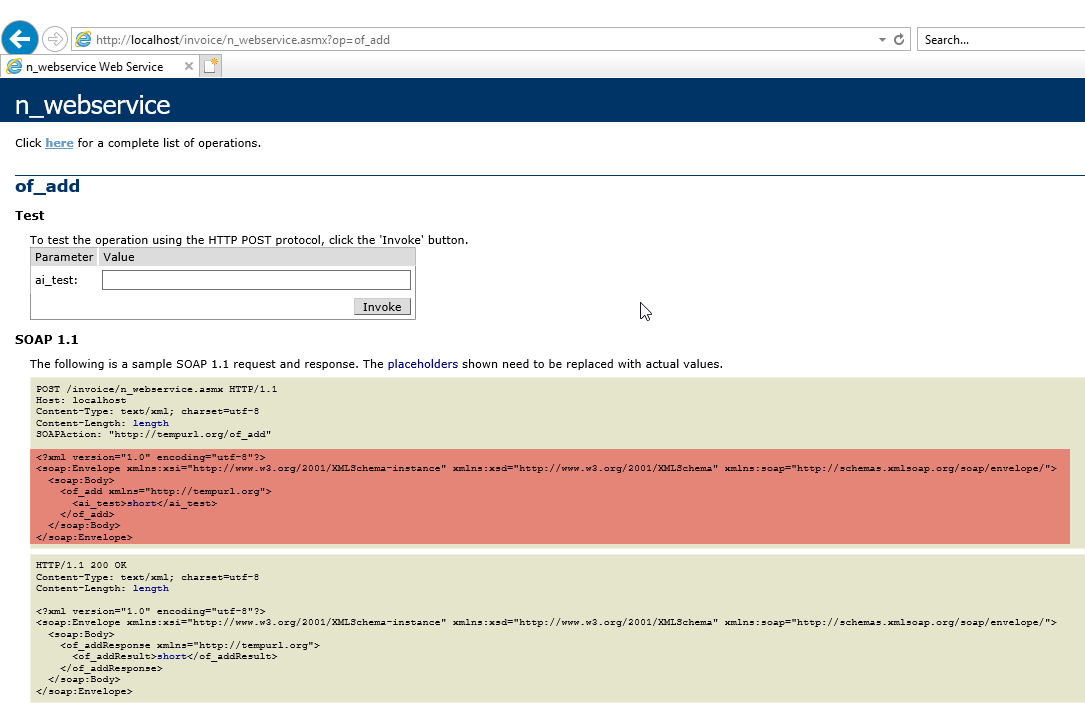
Open the SOAP Web service on IE as shown below. Copy the
associated SOAP sample request. Refer to the highlighted content below.
(If you don’t see this content, please contact your service provider to
get such a sample request.)
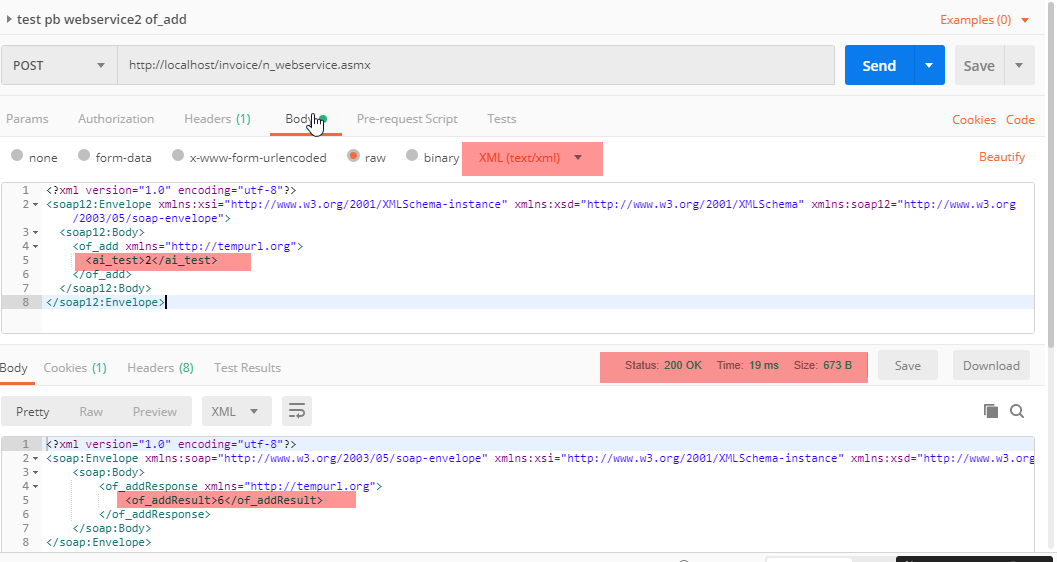
Use a third party tool like Postman to verify what protocol and
arguments you need to use to successfully call the Web service
API.
Note: You need to replace the argument in the XML you copied in
the previous step with the real argument to call the API. In this
sample, we replace the word short (data type of the parameter ai_test
for the of_add method) with the real argument (2).
2. Use the HTTPClient object to call the API
After you verified successfully with Postman, apply the same
protocol and arguments to HTTPClient object in your PB code.
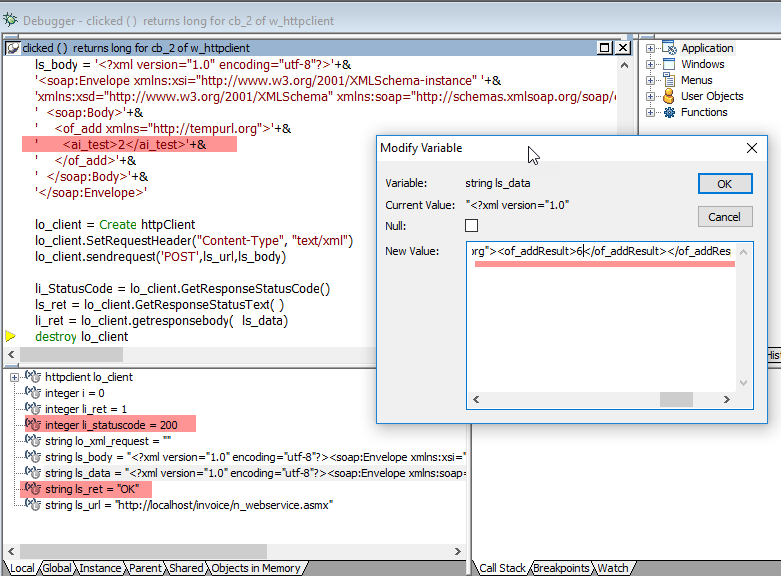
Here is the sample code:
|
1 2 3 4 5 6 7 8 9 10 11 12 13 14 15 16 17 18 19 20 21 22 23 24 |
httpClient lo_client integer li_ret , i , li_StatusCode String lo_xml_request string ls_url string ls_data string ls_body string ls_ret ls_url ="http://localhost/invoice/n_webservice.asmx" ls_body = '<?xml version="1.0" encoding="utf-8"?>'+& '<soap:Envelope xmlns:xsi="http://www.w3.org/2001/XMLSchema-instance" '+& 'xmlns:xsd="http://www.w3.org/2001/XMLSchema" xmlns:soap="http://schemas.xmlsoap.org/soap/envelope/">'+& ' <soap:Body>'+& ' <of_add xmlns="http://tempurl.org">'+& ' <ai_test>2</ai_test>'+& ' </of_add>'+& ' </soap:Body>'+& '</soap:Envelope>' lo_client = Create httpClient lo_client.SetRequestHeader("Content-Type", "text/xml") lo_client.sendrequest('POST',ls_url,ls_body) li_StatusCode = lo_client.GetResponseStatusCode() ls_ret = lo_client.GetResponseStatusText( ) li_ret = lo_client.getresponsebody( ls_data) destroy lo_client |
The new approach for calling SOAP Web service is clean and simple
and it gives you more flexibility than the previous approach.
Note: If you want to use the PBDOM Object to build the XML
content, you can refer to this
knowledge base.
Call simple ASP.NET Web Service using
HTTPClient
1. Build a Web Service
Build a simple Web Service project based on .NET Framework, then
directly add a Web Service (ASMX) object WebService into this
project.
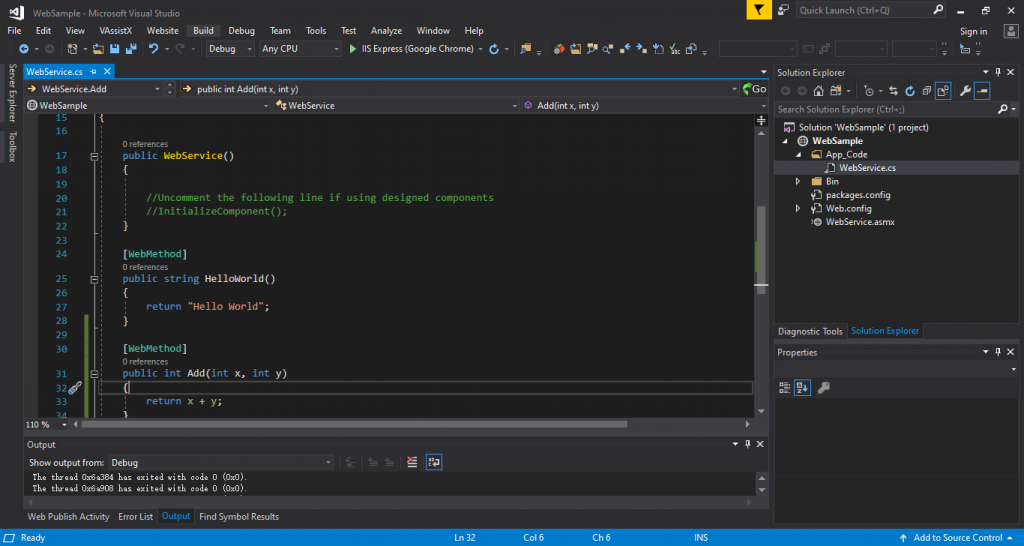
Here below is the C# code for reference:
|
1 2 3 4 5 6 7 8 9 10 11 12 13 14 15 16 17 18 19 20 21 22 23 24 25 26 27 28 29 30 |
using System; using System.Collections.Generic; using System.Linq; using System.Web; using System.Web.Services; ///<summary> /// Summary description for WebService ///</summary> [WebService(Namespace = "http://tempuri.org/")] [WebServiceBinding(ConformsTo = WsiProfiles.BasicProfile1_1)] // To allow this Web Service to be called from script, using ASP.NET AJAX, uncomment the following line. // [System.Web.Script.Services.ScriptService] public class WebService : System.Web.Services.WebService { public WebService() { //Uncomment the following line if using designed components //InitializeComponent(); } [WebMethod] public string HelloWorld() { return "Hello World"; } [WebMethod] public int Add(int x, int y) { return x + y; } } |
2. Find the correct arguments to call the WebService
This sample Web Service has only two APIs. One is the HelloWorld
method that returns a string and the other one is the Add method that
has two int type input parameters and returns an int value.
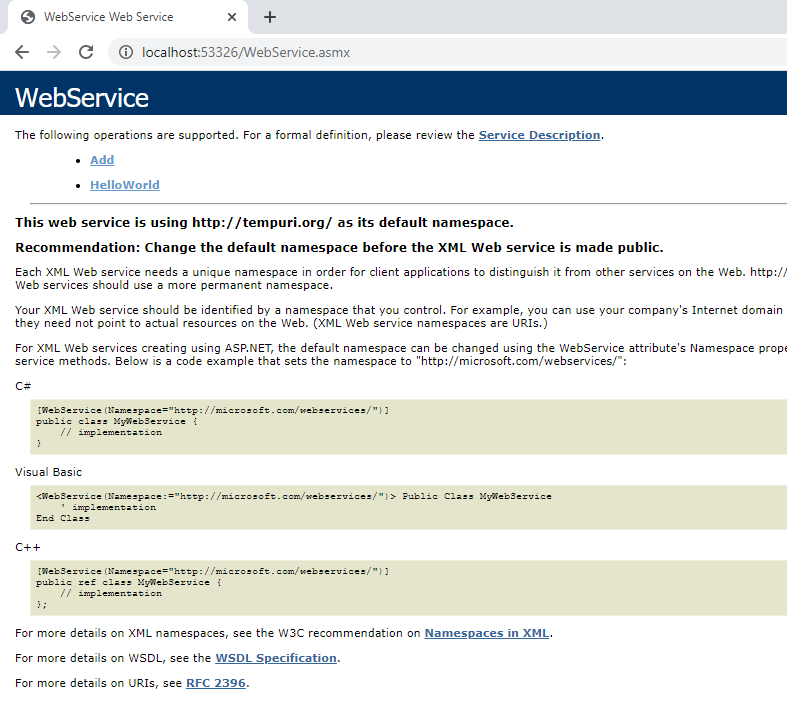
First of all, use a third party tool to verify what protocol and
arguments you need to use to call this Web Service API.
For example, we use Postman to verify it here.
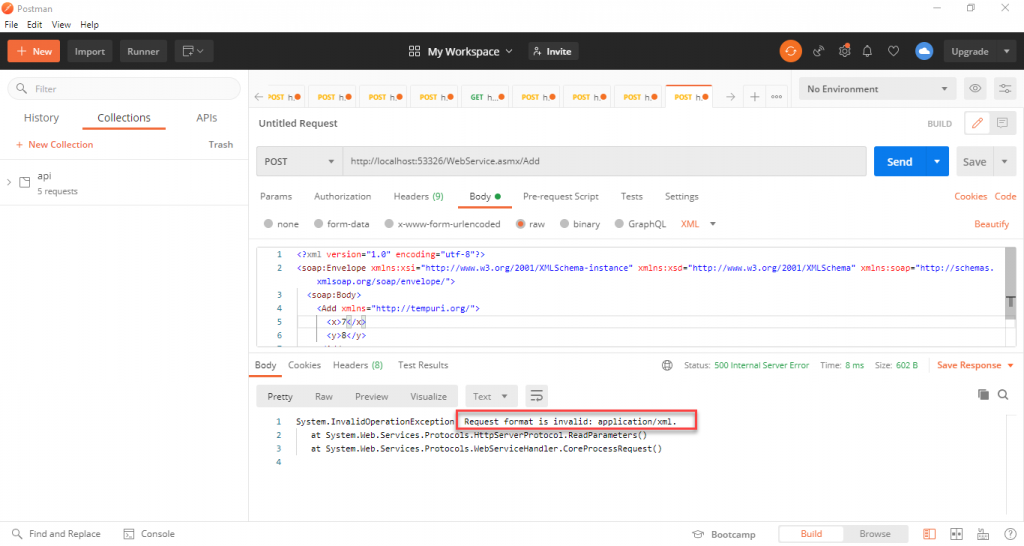
From the result you can see the request format of the current API
is different from the one we introduced in the previous section. The
Content-Type should be set to application/x-www-form-urlencoded instead
of application/xml.
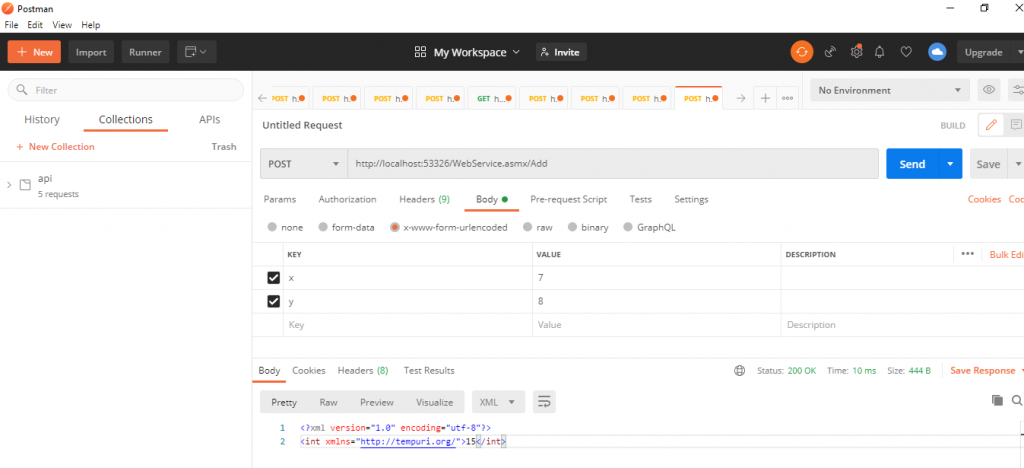
3. Use the HTTPClient object to call the Add method of this
API.
After you verified successfully with Postman, apply the same
request protocol to the HTTPClient object in your PB code.
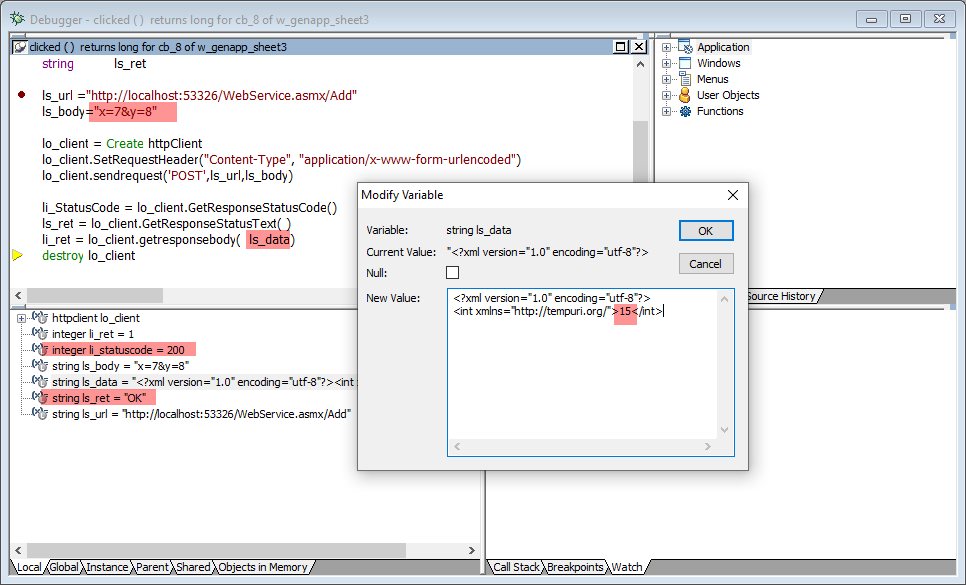
Here below is the sample code:
|
1 2 3 4 5 6 7 8 9 10 11 12 13 14 15 |
httpClient lo_client integer li_ret , li_StatusCode string ls_url string ls_data string ls_body string ls_ret ls_url ="http://localhost:53326/WebService.asmx/Add" ls_body="x=7&y=8" lo_client = Create httpClient lo_client.SetRequestHeader("Content-Type", "application/x-www-form-urlencoded") lo_client.sendrequest('POST',ls_url,ls_body) li_StatusCode = lo_client.GetResponseStatusCode() ls_ret = lo_client.GetResponseStatusText( ) li_ret = lo_client.getresponsebody( ls_data) destroy lo_client |