Building a supporting user object
So far you have seen how your Pipeline object defines the details
of the data and access for a pipeline, but a Pipeline object does not
include the logistical supports — properties, events, and functions —
that an application requires to handle pipeline execution and
control.
About the Pipeline system
object
To provide these logistical supports, you must build an
appropriate user object inherited from the PowerBuilder Pipeline system
object. The following table shows some of the system object’s
properties, events, and functions that enable your application to manage
a Pipeline object at runtime.
|
Properties |
Events |
Functions |
|---|---|---|
|
DataObject RowsRead RowsWritten RowsInError Syntax |
PipeStart PipeMeter PipeEnd |
Start Repair Cancel |
A little later in this chapter you will learn how to use most of
these properties, events, and functions in your application.
To build the supporting user object for a pipeline:
-
Select Standard Class from the PB Object tab of the New dialog
box.The Select Standard Class Type dialog box displays, prompting
you to specify the name of the PowerBuilder system object (class)
from which you want to inherit your new user object: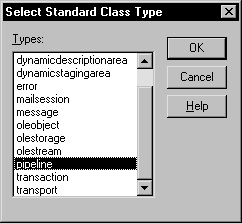
-
Select pipeline and click OK.
-
Make any changes you want to the user object (although none
are required). This might involve coding events, functions, or
variables for use in your application.To learn about one particularly useful specialization you can
make to your user object, see Monitoring pipeline
progress.Planning ahead for reuse
As you work on your user object, keep in mind that it can be
reused in the future to support any other pipelines you want to
execute. It is not automatically tied in any way to a particular
Pipeline object you have built in the Data Pipeline
painter.To take advantage of this flexibility, make sure that the
events, functions, and variables you code in the user object are
generic enough to accommodate any Pipeline object. -
Save the user object.
For more information on working with the User Object painter, see
the section called “Working with User Objects” in Users Guide.