Building a Pipeline object
You must build a Pipeline object to specify the data definition
and access aspects of the pipeline that you want your application to
execute. Use the Data Pipeline painter in PowerBuilder to create this
object and define the characteristics you want it to have.
Characteristics to define
Among the characteristics you can define in the Data Pipeline
painter are:
-
The source tables to access and the data to retrieve from them
(you can also access database stored procedures as the data source) -
The destination table to which you want that data piped
-
The piping operation to perform (create, replace, refresh,
append, or update) -
The frequency of commits during the piping operation (after
every n rows are piped, or after all rows are piped, or not at all
— if you plan to code your own commit logic) -
The number of errors to allow before the piping operation is
terminated -
Whether or not to pipe extended attributes to the destination
database (from the PowerBuilder repository in the source
database)
For full details on using the Data Pipeline painter to build your
Pipeline object, see the section called “Working with Data Pipelines” in Users Guide.
Example
Here is an example of how you would use the Data Pipeline painter
to define a Pipeline object named pipe_sales_extract1 (one of two
Pipeline objects employed by the w_sales_extract window in a sample
order entry application).
The source data to pipe
This Pipeline object joins two tables (Sales_rep and
Sales_summary) from the company’s sales database to provide the source
data to be piped. It retrieves just the rows from a particular quarter
of the year (which the application must specify by supplying a value for
the retrieval argument named quarter):
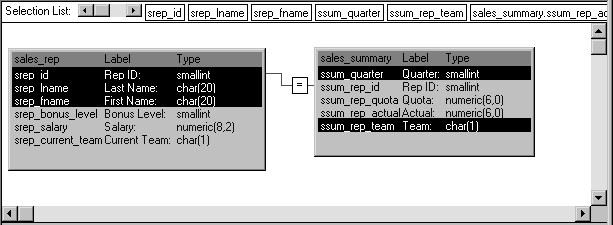
Notice that this Pipeline object also indicates specific columns
to be piped from each source table (srep_id, srep_lname, and
srep_fname from the Sales_rep table, as well as ssum_quarter and
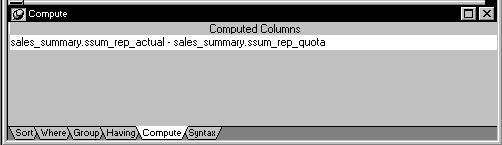
ssum_rep_team from the Sales_summary table). In addition, it defines a
computed column to be calculated and piped. This computed column
subtracts the ssum_rep_quota column of the Sales_summary table from the
ssum_rep_actual column:
How to pipe the data
The details of how pipe_sales_extract1 is to pipe its source data
are specified here:
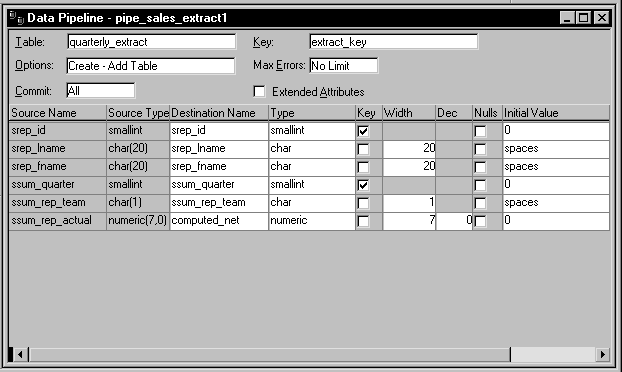
Notice that this Pipeline object is defined to create a new
destination table named Quarterly_extract. A little later you will learn
how the application specifies the destination database in which to put
this table (as well as how it specifies the source database in which to
look for the source tables).
Also notice that:
-
A commit will be performed only after all appropriate rows
have been piped (which means that if the pipeline’s execution is
terminated early, all changes to the Quarterly_extract table will be
rolled back). -
No error limit is to be imposed by the application, so any
number of rows can be in error without causing the pipeline’s
execution to terminate early. -
No extended attributes are to be piped to the destination
database. -
The primary key of the Quarterly_extract table is to consist
of the srep_id column and the ssum_quarter column. -
The computed column that the application is to create in the
Quarterly_extract table is to be named computed_net.