Browsing the class hierarchy
PowerBuilder provides a Browser that can show the hierarchy of the
built-in PowerBuilder system objects and the hierarchy of ancestor and
descendant windows, menus, and user objects you create. In
object-oriented terms, these are called class hierarchies: each
PowerBuilder object defines a class.
Regenerating objects
The Browser also provides a convenient way to regenerate objects
and their descendants. For more information, see Regenerating library entries.
To browse the class hierarchy of PowerBuilder system
objects:
-
Click the Browser button in the PowerBar.
-
Choose the System tab to show the built-in PowerBuilder
objects. -
In the left pane, scroll down the object list and select the
powerobject. -
Display the pop-up menu for the powerobject and choose Show
Hierarchy. -
Select Expand All from the pop-up menu and scroll to the
top.The hierarchy for the built-in PowerBuilder objects
displays.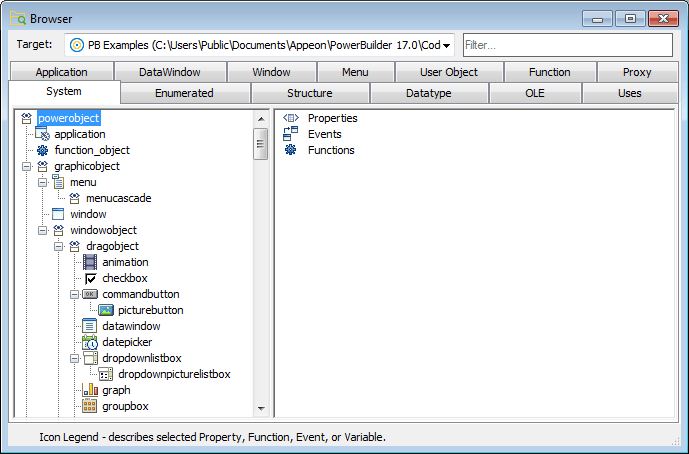
Getting context-sensitive Help in the Browser
To get context-sensitive Help for an object, control, or
function, select Help from its pop-up menu.
To display the class hierarchy for other object types:
-
Choose the Menu, Window, or User Object tab.
If you choose any other object type, there is no inheritance
for the object type, so you cannot display a class hierarchy. -
In the left pane, select an object and choose Show Hierarchy
from its pop-up menu. -
Select an object and choose Expand All from its pop-up
menu.PowerBuilder shows the selected object in the current
application. Descendant objects are shown indented under their
ancestors.For example, if your application uses the PBDOM PowerBuilder
extension object, the pbdom_object displays on the User Object page.
You can select Show Hierarchy and Expand All from its pop-up menu to
display its descendant objects.