Breaking into the debugger when an exception is
thrown
When an application throws an exception while it is being
debugged, the debugger sees the exception before the program has a
chance to handle it.The debugger can allow the program to continue or
it can handle the exception. This is usually referred to as the
debugger’s first chance to handle the exception. If the debugger does
not handle the exception, the program sees the exception. If the
program does not handle the exception, the debugger gets a second
chance to handle it.
You can control whether the debugger handles first chance
exceptions in the Exception Setting dialog box. To open the dialog
box, open the Debugger and select Exceptions from the Debug menu. By
default, all exceptions inherit from their parent and all are set to
Continue. In the following illustration, the DivideByZeroError and
DWRuntimeError exceptions have been set to “Break into the
debugger.”
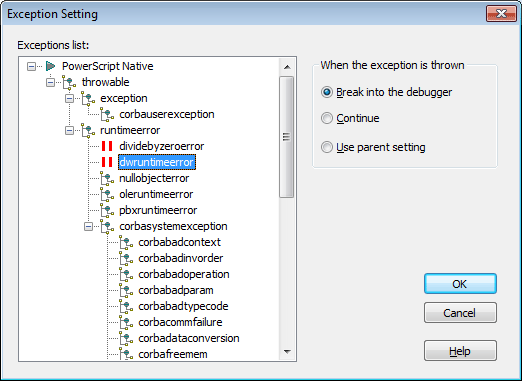
When one of these exceptions is thrown, a dialog box displays so
that you can choose whether to open the debugger (Break) or pass the
exception to the program (Ignore).