Background.Color
Description
Setting for the background color of a control.
In the painter
Background Color on the Background page or Font page in the
Properties view.
Value
A number that specifies the control’s background color.
For information on specifying colors, see Specifying colors.
The background color of a line is the color that displays
between the segments of the line when the pen style is not
solid.
If Background.Mode is transparent, Background.Color is
ignored.
Example
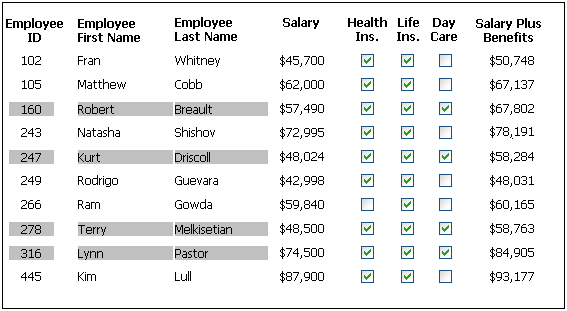
The following statement specifies that if the person represented
by the current row uses the day care benefit, the background color of
the control is set to light gray. If not, the background color is set
to white:
|
1 |
If(bene_day_care = 'Y', 15790320, 16777215) |
In this example, the condition is applied to the
Background.Color property for three controls: the emp_id column, the
emp_fname column, and the emp_lname column.
The following is a portion of the resulting DataWindow object.
Notice that the employee ID, first name, and last name have a gray
background if the employee uses the day care benefit: