Connection Information

To perform the requested action, WordPress needs to access your web server. Please enter your FTP credentials to proceed. If you do not remember your credentials, you should contact your web host.

Connection Type

Architecture – PB Docs 2022 – PowerBuilder Library

Architecture – PB Docs 2022

Architecture

The installable cloud apps must be deployed against
PowerServer 2021. PowerServer 2021 is a brand new PowerServer which
is totally different from the traditional PowerServer. For more
information, refer to this whitepaper: Deploying
PowerBuilder Apps to the Cloud
.

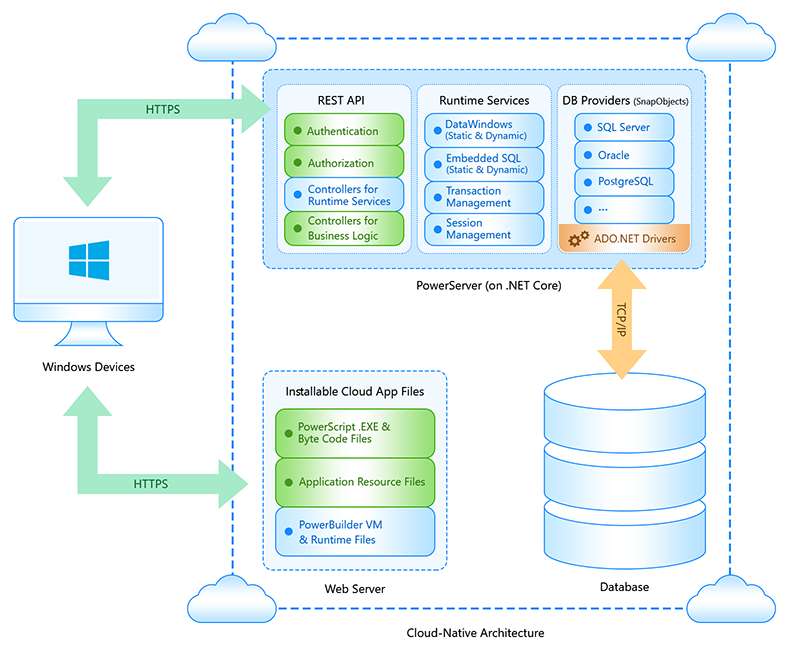
PowerServer-new.png

The following table introduces PowerServer 2021.

Web Server

Web API Server

Supported Database
Types

PowerServer 2021

IIS/Apache/Nginx on a Windows/Linux machine or
on Docker or cloud server.

PowerServer 2021 contains an API server which
uses standard REST APIs with REST security to handle the
HTTP/HTTPS requests from the client.

The host
environment of the API Server can be Kestrel, IIS, Docker,
or any environment that supports ASP.NET Core
apps.

ASE, MySQL, Oracle, PostgreSQL, SQL Anywhere,
and SQL Server

The following table introduces installable cloud apps.

Architecture

App Type

Client Type

Deployment
Technology

Code Changes

Database Connection

N-tier architecture.

Installed over
the Internet and updated automatically and
incrementally.

The installable cloud version of a PowerBuilder
application; it is installed as a desktop app on the client,
and can be launched directly from the
desktop.

Windows

Deployed with native PowerBuilder code and runs
against the PowerBuilder virtual machine (PBVM) on the
client. The PBVM is exactly the same one used by the
PowerBuilder classic client/server apps.

Supports almost all of the features of
PowerBuilder, therefore minimum code changes are
required.

The installable cloud app does not directly
connect to the database server. Instead, it communicates
with the Web APIs hosted in PowerServer (on .NET Core) via
HTTPS, and the Web APIs connect to the database server to
perform CRUD operations on the .NET data models and ESQLs
included in the PowerServer Web API project.

The .NET Core Web APIs support OAuth 2.0 or JWT
authentication to prevent unauthorized access; the
PowerServer and the database server shall be located in the
same LAN and be placed behind the corporate firewall.

In installable cloud apps, each transaction
uses a database connection, and when the transaction is
completed, the database connection is ended. Such
short-lived connections are more secure and less vulnerable
to network condition compared to long-running
connections.


Document get from Powerbuilder help
Thank you for watching.
Was this article helpful?
Subscribe
Notify of
guest
0 Comments
Oldest
Newest Most Voted
Inline Feedbacks
View all comments
0
Would love your thoughts, please comment.x
()
x