Add
code to the application Close event
Because the connection service manager was called by a global
variable, it is still available to the application and does not need to
be instantiated again (as it would if you had used a local
variable).
Now you call the connection service manager disconnect function to
close the database connection.
-
Double-click the pbtutor application icon in the System
Tree.The Application painter displays different views of the
tutorial application object. The Script view is part of a stack in
the default layout, but you might find it easier to detach it from
the stack or open a second Script view. -
Select close ( ) returns (none) in the second drop-down list
box of the Script view.There is no code yet for the application Close event.
-
Type the following lines for the Close event comment:
12Application Close script:Disconnect from the database -
Select all or part of the lines you just added.
Click the Comment button.
-
Type the following line below the comment you typed (you can
use AutoScript to complete the variable name and the function
name):1gnv_connect.of_DisconnectDB ( )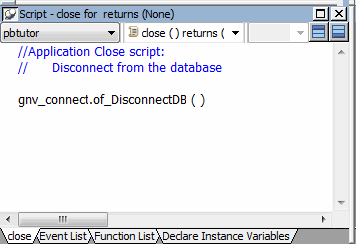
Releasing memory by setting global variables to
nullIf this were not the application Close event and you no
longer needed an instance of the global connection variable, you
could release the memory it occupies by calling the SetNull
function.PowerBuilder also provides a DESTROY statement to destroy
object instances. Do not use the DESTROY statement for local or
global variables for nonvisual objects. PowerBuilder garbage
collection removes any local variables that go out of scope. -
Right-click anywhere in the script area of the Script
view.Click Compile in the pop-up menu.
PowerBuilder compiles the Close script. If you get an error
message, look carefully at the lines you typed to make sure there is
no mistyped variable or object name. -
Click the Close button in PainterBar1.
A message box asks if you want to save your changes to the
Application object in the application library file. -
Click Yes.
This saves your changes and closes the Application
painter.