Add an
extra Script view
The default Application painter layout actually has two Script
views. One of the Script views displays the script for an Application
object event, and the other Script view displays the declared variables
for the object instance or the entire application. Both of these Script
views are in the same stack of tabbed views (panes).
Now you add a third Script view that is not part of a stack of
tabbed panes. You can add multiple Script views to your painter layout,
but no two Script views can display the same script at the same
time.
-
Select View>Script from the menu bar.
A new Script view displays. It is not attached to a stack of
tabbed panes. It lists the Application object in the left drop-down
list box. The other two drop-down lists are empty and the right
drop-down list is grayed out.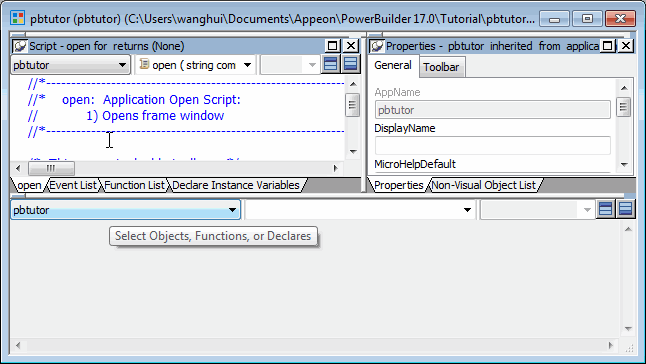
If an existing Script view shows the Open event, the new
Script view is empty. Otherwise it displays the Open event. -
Select the Close event from the second drop-down list
box.If another Script view is already open to the Close event, an
error message displays in the PowerBuilder status bar.