About
Tab controls
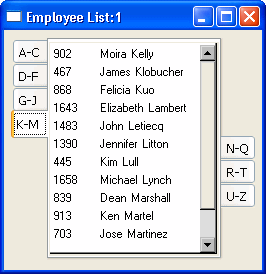
A Tab control is a container for tab pages that display other
controls. One page at a time fills the display area of the Tab control.
Each page has a tab like an index card divider. The user can click the tab
to switch among the pages:
The Tab control allows you to present many pieces of information in
an organized way. You add, resize, and move Tab controls just as you do
any control. The Users Guide describes how to add controls to
a window or custom visual user object.
Tab terms
You need to know these definitions:
Tab control
A control that you place in a window or user object that contains
tab pages. Part of the area in the Tab control is for the tabs associated
with the tab pages. Any space that is left is occupied by the tab pages
themselves.
Tab page
A user object that contains other controls and is one of several
pages within a Tab control. All the tab pages in a Tab control occupy the
same area of the control and only one is visible at a time. The active tab
page covers the other tab pages.
You can define tab pages right in the Tab control or you can define
them in the User Object painter and insert them into the Tab control,
either in the painter or during execution.
Tab
The visual handle for a tab page. The tab displays a label for the
tab page. When a tab page is hidden, the user clicks its tab to bring it
to the front and make the tab page active.