About MobiLink synchronization
MobiLink is a session-based synchronization system that allows
two-way synchronization between a main database, called the consolidated
database, and many remote databases.
This section introduces some MobiLink terms and concepts.
Where to find additional information
Detailed information about MobiLink synchronization is provided in
the MobiLink Getting Started, the MobiLink – Client Administration, and
the Mobilink – Server Administration books. These books are available
online on the SQL Anywhere Product Manuals website at http://dcx.sap.com/index.html.
If you are already familiar with MobiLink, go to Working with PowerBuilder synchronization
objects to learn about PowerBuilder integration with
MobiLink.
Data movement and
synchronization
Data movement occurs when shared data is distributed over multiple
databases on multiple nodes and changes to data in one database are
applied to the corresponding data in other databases. Data can be moved
using replication or synchronization.
Data replication moves all transactions from one database to
another, whereas data synchronization moves only the net result of
transactions. Both techniques get their information by scanning
transaction log files, but synchronization uses only updated log file
segments instead of the full log file, making data movement much faster
and more efficient.
With synchronization, data is available locally and can be modified
without a connection to a server. MobiLink synchronization uses a loose
consistency model, which means that all changes are synchronized with each
site over time in a consistent manner, but different sites might have
different copies of data at any instant. Only successful transactions are
synchronized.
Consolidated and remote
databases
The consolidated database, which can be any ODBC-compliant database,
such as SQL Anywhere, SAP Adaptive Server Enterprise, Oracle, IBM DB2 UDB,
or Microsoft SQL Server, holds the master copy of all the data.
The remote database contains a subset of the consolidated data.
Although MobiLink can synchronize SQL Anywhere and UltraLite databases,
for PowerBuilder applications, remote databases must be SQL Anywhere
databases.
The MobiLink synchronization
server
The MobiLink synchronization server, mlsrv11, manages the
synchronization process and provides the interface between remote
databases and the consolidated database server. All communication between
the MobiLink synchronization server and the consolidated database occurs
through an ODBC connection.The consolidated database and synchronization
server often reside on the same machine, but that is not a
requirement.
The MobiLink server must be running before a synchronization process
is launched. You can start the MobiLink synchronization server from the
Utilities folder in the Objects view in the Database painter.
For information about starting the server from the command line, see
“Running the MobiLink server” in the online MobiLink – Server
Administration book.
MobiLink hierarchy
MobiLink typically uses a hierarchical configuration. The nodes in
the hierarchy can reside on servers, desktop computers, and handheld or
embedded devices. A simple hierarchy might consist of a consolidated
database on a server and multiple remote databases on mobile devices. A
more complex hierarchy might contain multiple levels in which some sites
act as both remote and consolidated databases. For PowerBuilder
applications, any consolidated database that also acts as a remote
database must be a SQL Anywhere database.
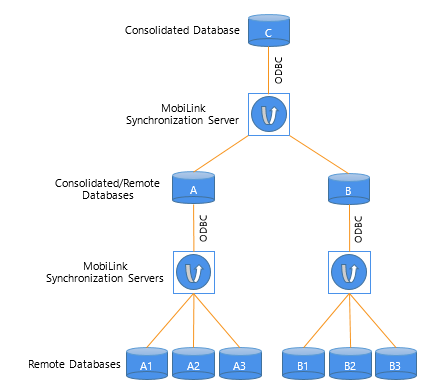
For example, suppose remote sites A1, A2, and A3 synchronize with a
consolidated database A on a local server, and remote sites B1, B2, and B3
synchronize with a consolidated database B on another local server. A and
B in turn act as remote sites and synchronize with a consolidated database
C on a master server. C can be any ODBC-compliant database, but A and B
must both be SQL Anywhere databases.
Figure: MobiLink hierarchy
Synchronization scripts
MobiLink synchronization is an event-driven process. When a MobiLink
client initiates a synchronization, a number of synchronization events
occur inside the MobiLink server. When an event occurs, MobiLink looks for
a script to match the synchronization event. If you want the MobiLink
server to take an action, you must provide a script for the event.
You can write synchronization scripts for connection-level events
and for events for each table in the remote database. You save these
scripts in the consolidated database.
You can write scripts using SQL, Java, or .NET. For more information
about event scripts and writing them in the MobiLink Synchronization
plug-in in SQL Central, see Preparing
consolidated databases.
The MobiLink synchronization
client
SQL Anywhere clients at remote sites initiate synchronization by
running a command-line utility called dbmlsync. This utility synchronizes
one or more subscriptions in a remote database with the MobiLink
synchronization server. Subscriptions are described in Publications, articles, users, and
subscriptions. For more information about the dbmlsync utility and
its options, see “dbmlsync utility” in the index of the SQL Anywhere
online books.
In PowerBuilder, synchronization objects that you create with the
ASA MobiLink Synchronization wizard manage the dbmlsync process. For more
information, see Working with PowerBuilder
synchronization objects.
Publications, articles, users, and
subscriptions
A publication is a database object on the remote database that
identifies tables and columns to be synchronized. Each publication can
contain one or more articles. An article is a database object that
represents a whole table, or a subset of the columns and rows in a
table.
A user is a database object in the remote database describing a
unique synchronization client. There is one MobiLink user name for each
remote database in the MobiLink system. The ml_user MobiLink system table,
located in the consolidated database, holds a list of MobiLink user names.
These names are used for authentication.
A subscription associates a user with one or more publications. It
specifies the synchronization protocol (such as TCP/IP, HTTP, or HTTPS),
address (such as myserver.acmetools.com), and additional optional
connection and extended options.
Users, publications, and subscriptions are created in the remote
database. You can create them in SQL Central with the SQL Anywhere plug-in
(not the MobiLink Synchronization plug-in). For information about creating
users, publications, and subscriptions, see Creating remote databases.
The synchronization process
Dbmlsync connects to the remote database using TCP/IP, HTTP, or
HTTPS, and prepares a stream of data (the upload stream) to be uploaded to
the consolidated database. Dbmlsync uses information contained in the
transaction log of the remote database to build the upload stream. The
upload stream contains the MobiLink user name and password, the version of
synchronization scripts to use, the last synchronization timestamp, the
schema of tables and columns in the publication, and the net result of all
inserts, updates, and deletes since the last synchronization.
After building the upload stream, dbmlsync uses information stored
in the specified publication and subscription to connect to the MobiLink
synchronization server and to exchange data.
When the MobiLink synchronization server receives data, it updates
the consolidated database, then builds a download stream that contains all
relevant changes and sends it back to the remote site. At the end of each
successful synchronization, the consolidated and remote databases are
consistent. Either a whole transaction is synchronized, or none of it is
synchronized. This ensures transactional integrity at each
database.