About
DataWindow data expressions
Contents
The Object property of the DataWindow control lets you specify
expressions that refer directly to the data of the DataWindow object in
the control. This direct data manipulation allows you to access small
and large amounts of data in a single statement, without calling
methods.
There are several variations of data expression syntax, divided
into three groups. This section summarizes these syntaxes. The syntaxes
are described in detail later in this chapter.
Data in columns or computed fields when you
know the name
One or all items
(if rownum is absent, include either buffer or datasource)
|
1 |
dwcontrol.Object.columnname {.buffer } {.datasource } { [ rownum ] } |
Returns a single value (for a specific row number) or an array of
values (when rownum is omitted) from the column.
See Syntax for one or
all data items in a named column.
Selected items
|
1 |
dwcontrol.Object.columnname {.Primary }{.datasource }.Selected |
Returns an array of values from the column with an array element
for each selected row.
See Syntax for selected data
in a named column.
Range of items
|
1 |
dwcontrol.Object.columnname {.buffer } {.datasource } [ startrownum, endrownum ] |
Returns an array of values from the column with an array element
for each row in the range.
See Syntax for a
range of data in a named column.
Data in numbered columns
Single items
|
1 |
dwcontrol.Object.Data {.buffer } {.datasource } [ rownum, colnum ] |
Returns a single item whose datatype is the datatype of the
column.
See Syntax for a single
data item in a DataWindow.
Blocks of data
involving a range of rows and columns
|
1 |
dwcontrol.Object.Data {.buffer } {.datasource } [ startrownum, startcolnum, endrownum, endcolnum ] |
Returns an array of structures or user objects. The structure
elements match the columns in the range. There is one array element for
each row in the range.
See Syntax for data
in a block of rows and columns.
Whole rows
Single row or all rows
|
1 |
dwcontrol.Object.Data {.buffer } {.datasource } { [ rownum ] } |
Returns one structure or user object (for a single row) or an
array of them (for all rows). The structure elements match the columns
in the DataWindow object.
See Syntax for data
in a single row or all rows.
Selected rows
|
1 |
dwcontrol.Object.Data {.Primary } {.datasource } .Selected |
Returns an array of structures or user objects. The structure
elements match the columns in the DataWindow object. There is one array
element for each selected row.
See Syntax for all data
from selected rows.
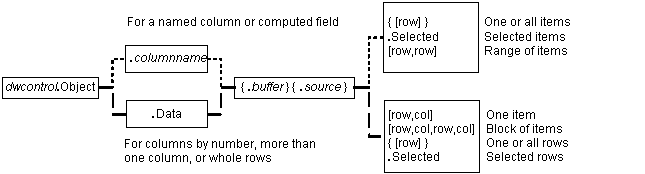
Summary of syntaxes
This diagram summarizes the variations in data expression
syntax:
Figure: Variations in data expression syntax
For information about getting and setting values of DataWindow
object properties using a similar syntax, see Accessing DataWindow Object Properties in
Code