About
calling PowerScript from C++ applications
If you have a PowerBuilder custom class user object that performs
intensive programming that would be useful to an application that you need
to write in C++, you can access the object directly from the C++
application using PBNI. You do not need to make the user object into a COM
component or automation server.
To call functions on a PowerBuilder object, you can embed the PBVM
in the C++ application. The C++ application must load the PBVM by loading
pbvm.dll with the Windows LoadLibrary function, get a pointer to the
IPB_VM interface by calling the PB_GetVM function exported by pbvm.dll,
and create a session by calling the IPB_VM CreateSession function.
The application can then create an instance of the PowerBuilder
class and invoke its functions through the IPB_Session interface.
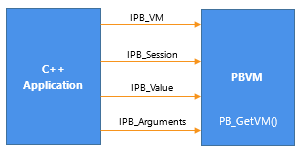
The following figure illustrates the relationship between the C++
application and the interfaces provided by the PBVM.
Figure: Embedding the PBVM in a C++ application