Paper size of PDF exported by NativePDF differs from
Ghostscript
Symptom
After upgrading PowerBuilder to a later version, if you switch
from Ghostscript to NativePDF, the paper size of the exported PDF file
is different from when using Ghostscript.
-
The paper size of the PDF file exported using NativePDF is A4
210 x 297 mm. -
The paper size of the PDF file exported using Ghostscript is
Letter 8 1/2 x 11.0 in.
Environment
PowerBuilder 2017 R3, 2019, 2021 and the latest version
Cause
NativePDF and Ghostscript use different sizes of paper:
-
The paper size used by NativePDF defaults to A4 210 x 297
mm. -
The paper size used by Ghostscript in PowerBuilder defaults to
Letter 8 1/2 x 11 in.
Solution
If you want to export the same paper size of PDF as Ghostscript
with NativePDF, you can use either of the following solutions:
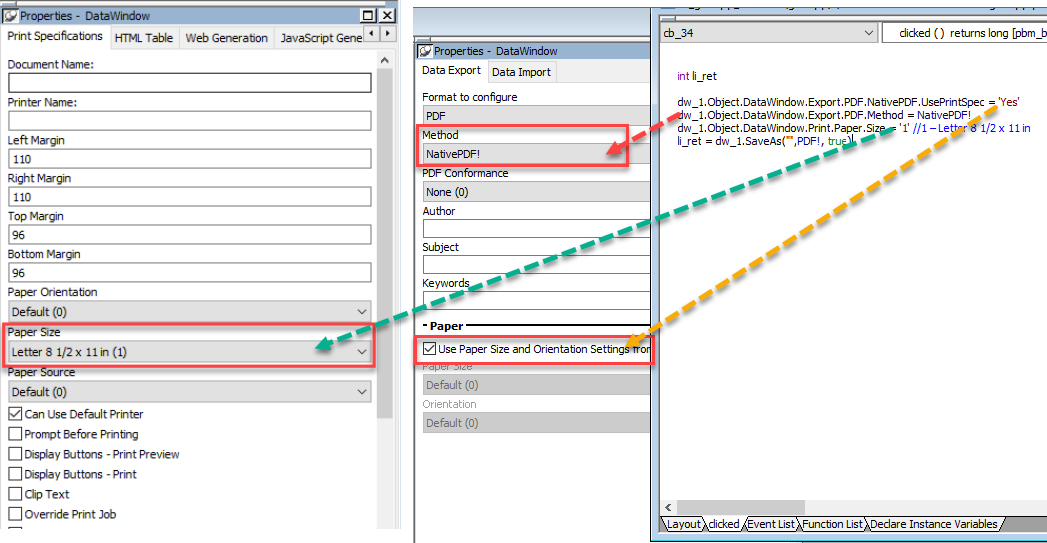
Solution #1 – Enable UsePrintSpec for exporting with
NativePDF
Modify the code for exporting or change the corresponding settings
in DataWindow Properties.
|
1 2 3 4 5 |
int li_ret dw_1.Object.DataWindow.Export.PDF.NativePDF.UsePrintSpec = 'Yes' dw_1.Object.DataWindow.Export.PDF.Method = NativePDF! dw_1.Object.DataWindow.Print.Paper.Size = '1' //1 – Letter 8 1/2 x 11 in li_ret = dw_1.SaveAs("",PDF!, true) |
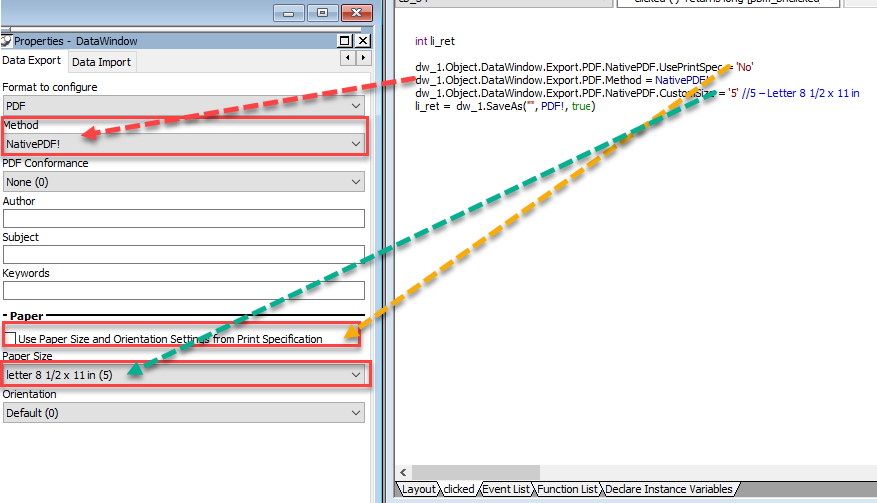
Solution #2 – Set CustomSize for exporting with NativePDF
Modify the code for exporting or change the corresponding settings
in DataWindow Properties.
|
1 2 3 4 5 |
int li_ret dw_1.Object.DataWindow.Export.PDF.NativePDF.UsePrintSpec = 'No' dw_1.Object.DataWindow.Export.PDF.Method = NativePDF! dw_1.Object.DataWindow.Export.PDF.NativePDF.CustomSize = '5' //5 – Letter 8 1/2 x 11 in li_ret = dw_1.SaveAs("", PDF!, true) |
BTW, you can refer to the following documentation for more
information on using NativePDF.
https://docs.appeon.com/pb2022r2/datawindow_reference/XREF_36021_Alphabetical_list.html#XREF_19761_Export_PDF_NativePDF_UsePrintSpec
https://docs.appeon.com/pb2022r2/pbug/ug16818.html#Saving_as_PDF_using_PDFlib