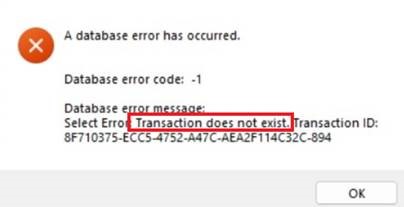
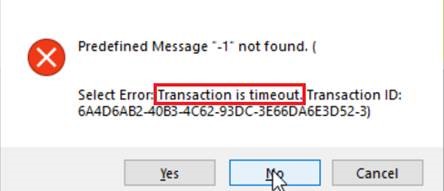
Transaction does not exist or Transaction is timeout
The “Transaction does not exist” or “Transaction is timeout”
error occurs when you run the installable cloud app and execute a
database operation.
The “Transaction is timeout” error only occurs in a very short
time when the transaction has timed out but not cleared yet
(time-out transactions are cleared automatically by PowerServer
every 60 seconds). When transaction is cleared, the “Transaction
does not exist” error occurs.
Cause 1
The actual amount of time required to execute the database
transaction exceeds the transaction timeout value, which is 120
seconds by default.
Solution 1
Increase the transaction timeout value based on the
application’s actual requirement. Note that it is recommended to set
the transaction timeout according to the needs of your application
rather than excessively long. Please refer to Configure the timeout
settings.
Cause 2
The transaction management in the original PowerBuilder code
may have a defect in design. For example, when the transaction
object has AutoCommit = false, some transactions are not committed
or rolled back timely.
Solution 2
Add the corresponding Commit/Rollback logic to finish the
transaction timely.
Cause 3
The difference in transaction mechanism between PowerBuilder
and PowerServer can lead to timeout issues in stored procedure (or
cursors).
In PowerServer installable cloud apps, network connection
problems can cause commands to fail, and if the transaction timeout
value is not set properly, it can lead to deadlocks of concurrent
calls. Therefore, it is very important to set a proper value for
transaction timeout in PowerServer. However, there is no such
concept as transaction timeout in PowerBuilder traditional C/S
applications because there is no network connection issues in C/S
architecture.
Such difference would cause problems in PowerServer: during
the execution of a stored procedure, if the transaction is not
closed (when Commit/Rollback is executed explicitly in the code or
AutoCommit = true), then when the transaction timed out in
PowerServer, a “Transaction is timeout” or “Transaction does not
exist” error occurs. PowerBuilder C/S app has no such error because
the transaction never times out in PowerBuilder C/S app.
Solution 3
According to the usage of stored procedure and cursor in your
project, decide whether you need to adjust the ProcedureInTransaction
parameter of Transaction.DBParm in the code:
-
If the stored procedure is only used for querying purpose
and does not involve any updates, it is not necessary to start a
transaction (set ProcedureInTransaction to 0 to not start a
transaction). -
If a small amount of code uses the stored procedure for
database updates, set ProcedureInTransaction to 1 during the
update and then set it to 0 after the transaction is committed.
This ensure the transaction is properly managed for the specific
code segment. View
code examples here. -
If a large amount of code uses the stored procedure for
database updates, and substantial code changes need to make, it
is recommended to keep the default value (1) of
ProcedureInTransaction and increase the transaction timeout
value to 3600 or higher (to be the same as the session timeout
value) so as to accommodate the potentially longer transaction
duration. For how to configure the timeout value, refer to Configure
the timeout settings.
Important
It is not recommended to use long connection to solve this
kind of problem, because with long connection, the error still
remains after it exceeds Transaction Timeout (it is not a feasible
solution at all). To learn about long connection, you can refer to
LongConnection.