Server setup
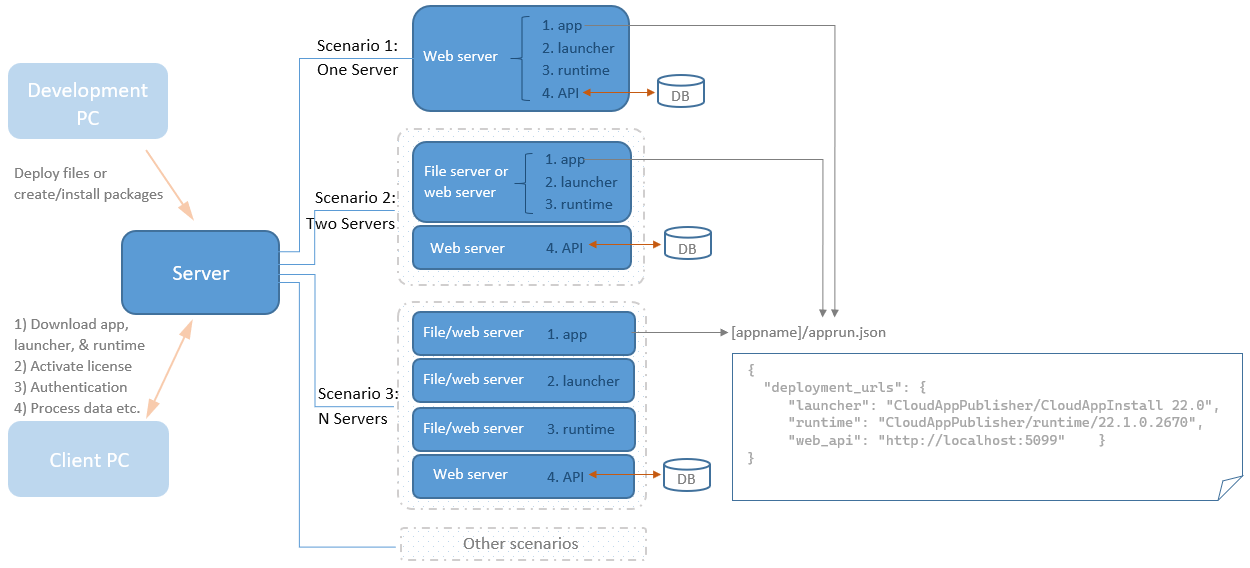
When building and deploying a PowerServer project successfully, you
will get a complete set of files physically divided into 4 standalone
components (app, launcher, runtime, and API). And you can host these
components in the same or different servers.
For example, you can host these 4 components in one single server
(as illustrated in Scenario 1), or host them separately (normally static
files such as the client app, launcher, & runtime are hosted together,
as illustrated in Scenario 2).
The host environment of the PowerServer Web APIs can be Kestrel,
IIS, docker container, Kubernetes, Azure App Service, or any other
environment that supports ASP.NET Core apps.
The host environment of the client app, launcher, and runtime can be
any file server such as Kestrel, IIS, Apache, Nginx etc. There is no
PowerScript execution on the file server, only file upload and
download.
Development & testing environment
For the local development & testing environment, you can choose
the Local Kestrel server, so PowerServer
Web APIs can run successfully with minimal efforts (only a few clicks).
Local Kestrel server is an internal web
server that is automatically included and enabled, therefore, no server
setup or configuration is required. All you need to do is to specify a
port number or simply use the default port number 5099.
When deploying to the local Kestrel server, the static files
(including the client app, launcher, and runtime) are deployed to the
wwwroot folder in the project directory by default (for example,
%username%source
epossalesdemo_cloudServerAPIswwwroot). The Run Project button will first run the PowerServer
Web APIs on Kestrel locally and then run the static files of the
installable cloud app automatically. (Read
more)

Production environment
You can choose from the following production environment to host the
PowerServer Web APIs.
1. Kestrel (read
more)
The Kestrel web server provides better request processing
performance to ASP.NET Core applications as it is an open-source,
cross-platform and light-weight web server; but it does not have advanced
features of web servers like IIS, Nginx, Apache etc.
Kestrel can run on Windows or Linux, in either development or
production environment. It can also run in containers.
Kestrel can be used by itself or with a reverse proxy server. When
deploying to the production environment, it is recommended to place
Kestrel behind a reverse proxy server.
2. Using IIS (out-of-process), Nginx, or Apache, with Kestrel (read more)
If PowerServer Web APIs uses the Kestrel server, then
Nginx/Apache/IIS can be used as a reverse proxy server. For IIS, this is
known as the IIS out-of-process
hosting.
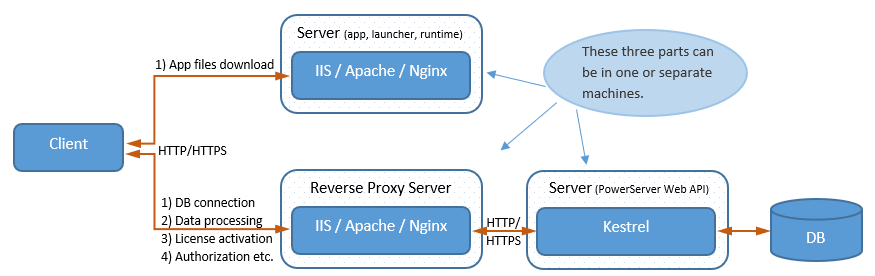
In the following graph, PowerServer Web APIs is hosted in Kestrel in
a reverse proxy configuration.
-
Kestrel serves the dynamic content (such as data processing
tasks) from the PowerServer Web APIs. -
The reverse proxy server (such as IIS, Nginx, Apache etc.)
forwards the requests to the PowerServer Web APIs running in Kestrel.
The reverse proxy server may reside on a dedicated machine or may be
deployed alongside a web server. -
The static content (such as the client app, launcher, and
runtime) can be hosted in the same Kestrel or in a separate file
server, in the same or different machine.
3. IIS (in-process) (read
more)
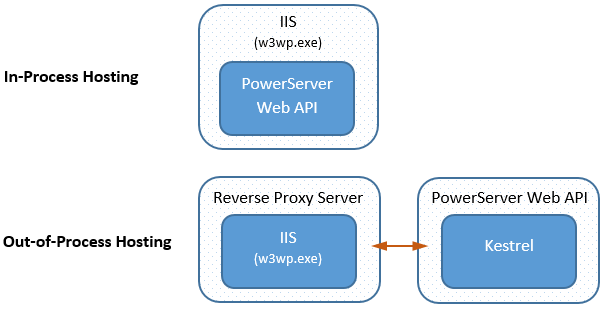
The PowerServer Web APIs can be directly hosted inside of an IIS
Application pool and run in the same process as its IIS worker process
(w3wp.exe); this is known as in-process
hosting. It is different from the out-of-process hosting which runs
the PowerServer Web APIs in a process separate from the IIS worker process
and forwards the requests made to the IIS reverse proxy to the Kestrel
server.
When you directly deploy to IIS from the IDE, or create a package
and then copy files to IIS, the PowerServer Web APIs is hosted in-process
automatically.
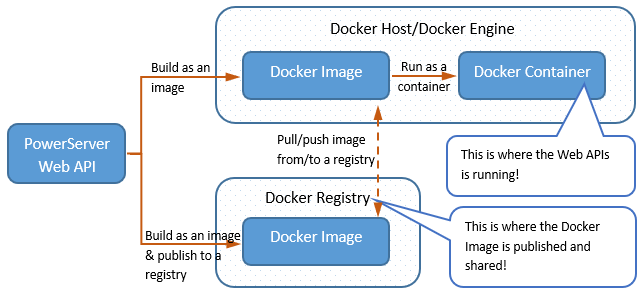
4. Docker (read more)
You can use SnapDevelop IDE to publish and deploy the PowerServer
Web API to Docker.
5. Kubernetes cluster (read
more)
After you create the docker container image for the PowerServer Web
APIs, you can also deploy the containerized application to the Kubernetes
cluster.
6. Azure (read
more)
You can also publish PowerServer Web APIs to Azure App Service
(Windows or Linux) or Azure Container Registry. Azure App Service is a
managed production environment where you can benefit from the Azure
security, load balancing, auto-scaling, and automated management.

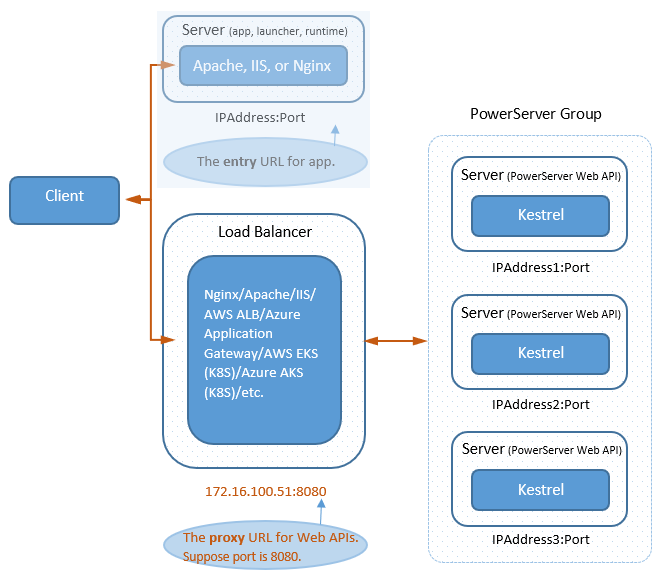
Load-balancing (read more)
PowerServer Web APIs provides no clustering function to support
load-balancing or fail-over; but you can install and configure a
third-party server (such as Nginx, Apache, IIS, AWS ALB, Azure Application
Gateway, AWS EKS (K8S), Azure AKS (K8S) etc.) as a load balancer to direct
requests to a group of servers. (Fail-over is currently
unsupported.)
The third-party server must support “sticky” or “persistent”
sessions.