PowerServer C# solution
The PowerServer C# solution is generated when you build the
PowerServer project in the IDE. It is an ASP.NET Core solution which
can be opened in a C# editor such as SnapDevelop, Visual Studio,
etc.
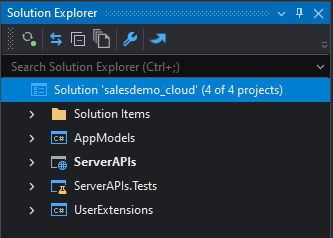
The PowerServer C# solution contains the following
projects:
-
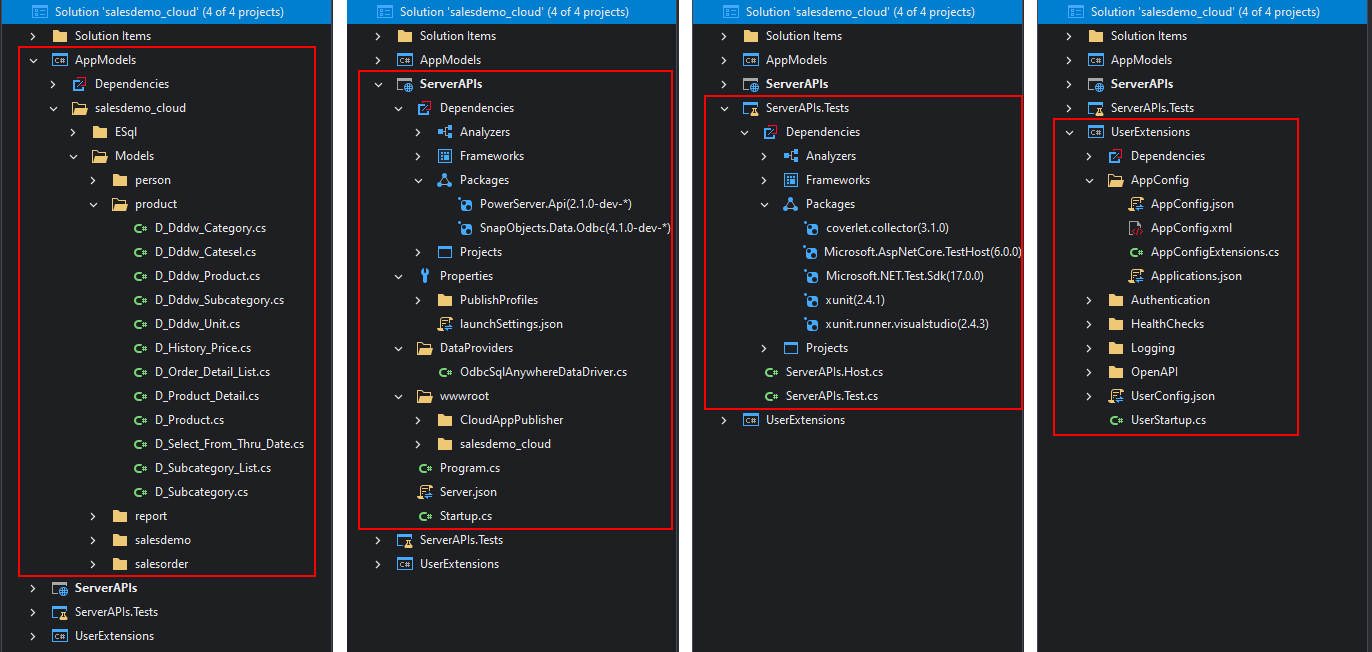
The AppModels project
contains the C# models (converted from the PowerBuilder
DataWindows/DataStores) and the embedded SQLs (ESQL) from the
PowerBuilder application. They will be automatically exposed via
REST/JSON APIs. -
The ServerAPIs project
contains the RESTFul APIs for handling the database connections,
data processing, PowerServer license activation etc. It contains
1) the project files for PowerServer Web APIs and 2) a “wwwroot”
sub-folder which contains the static files of the cloud app
launcher, runtime files and the application files. -
The ServerAPIs.Tests
project contains a number of test cases which can check if the
RESTFul APIs is running correctly after the ServerAPIs project is modified
manually. -
The UserExtensions project
contains miscellaneous tools such as logging, authentication, management APIs
etc. And as the project name suggests, you can also customize and
enhance this project by adding additional code and functionalities
in this project, and they will remain unchanged and unaffected
even when the solution is upgraded.
The PowerServer C# solution needs to download the following
NuGet packages: PowerServer.Core,
PowerServer.API, and the
corresponding data provider for .NET Core.
You can compile and run the ServerAPIs project in a C# editor or directly
run the compiled ServerAPIs.exe file
to start the PowerServer Web APIs.
PowerServer C# solution is a standard ASP.NET Core Web API
solution which you can
1) publish the Web APIs from any C# editor (such as SnapDevelop,
Visual Studio) or using .NET Core CLI. Take SnapDevelop for example,
you can publish the PowerServer Web APIs to IIS, Docker Container, or
Kubernetes from SnapDevelop.
2) write C# scripts to extend the functionalities, for example,
to implement the user authentication through a third-party
service.