Install the installable cloud app
If you choose to package the installable cloud app as an
executable installer or a zipped file, you will need to install or copy
the installable cloud app to the server(s).
To install the installable cloud app to the server:
-
Set up a server. You can follow instructions in the tutorial
Hosting Web APIs in
IIS, Hosting Web
APIs in Kestrel, Deploying
installable cloud apps to Kubernetes etc. -
Install the installable cloud app to the server.
-
If the generated package is the executable installer
([appname].exe), thenTo run the executable installer, double click the
[appname].exe file, then input
the web root of the server, and then click Install. Wait until the installation is
completed.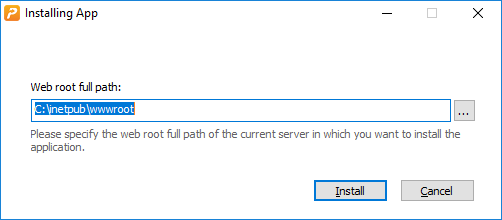
There will be four folders installed under the web root
(as shown in the figure below):-
the “CloudAppPublisher” folder which contains the
cloud app launcher and the PowerBuilder runtime files -
the “[appname]” folder (named after the App name configured in IDE, for
example “salesdemo_cloud”) which contains the application
files -
the “[solutionname]_API” folder which contains a
release version of PowerServer Web APIs. -
the web.config file
used by IIS to invoke the PowerServer Web APIs.
-
-
If the app package is the zip package ([appname].zip), then
To de-compress the zip package, right click the [appname].zip file and select Extract. There will be four folders
extracted. Copy these folders to the web root of the server, as
shown in the figure below.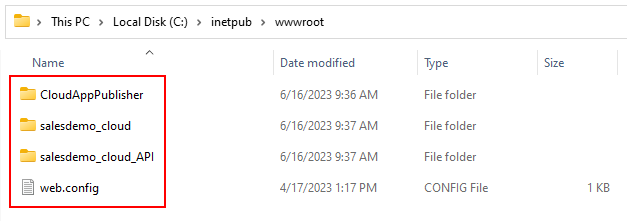
Note
Do not manually change the name of the installed or
de-compressed application folder on the server, otherwise the
application uninstall program will fail to run. -