Installing DB2 driver
For the first time for PowerServer Toolkit to connect to the DB2
database, you will need to install the corresponding .NET Core driver to
the development PC. When you select DB2
from the Provider list in the Database Configuration dialog box, you will be
prompted to have PowerBuilder automatically download and install the
driver from www.nuget.org or manually
download the driver from NuGet and then specify the location of driver
on the development PC.
-
If you select to install the driver from www.nuget.org, it
indicates that you agree with the license agreement. The driver will
be automatically downloaded from www.nuget.org to your
local path (%USERPROFILE%.netdbdrives). -
If the driver has already been downloaded from www.nuget.org to your
computer, you can select The driver already
exists locally and specify the location of the
driver.It must be the .NET Core driver (IBM.Data.DB2.Core 3.1.0.500) downloaded from
www.nuget.org,
otherwise installation will fail.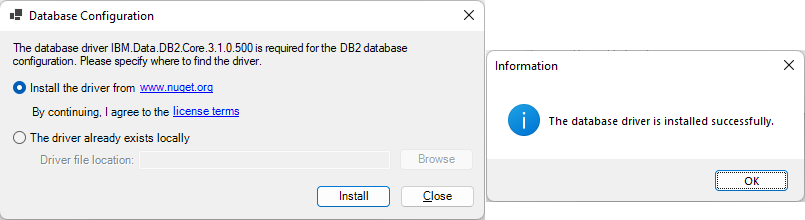
Note: the .NET Core driver for DB2 (IBM.Data.DB2.Core 3.1.0.500) requires the Visual
C++ Redistributable Packages for Visual Studio 2013 to run. If the
Visual C++ Redistributable Packages for Visual Studio 2013 is not
installed, you will be prompted when creating the database cache in the
PowerBuilder IDE.
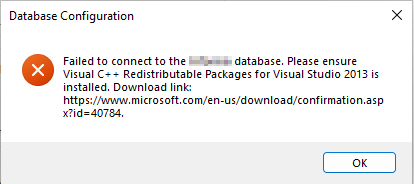
To resolve this error, you can download and install Visual C++
Redistributable Packages for Visual Studio 2013 from https://www.microsoft.com/en-us/download/confirmation.aspx?id=40784.