Adding an HTTP header manager
In case you have any specific headers that should be part of
the HTTP request, you can add an HTTP header manager. The HTTP
header manager lets you add or override HTTP request
headers.
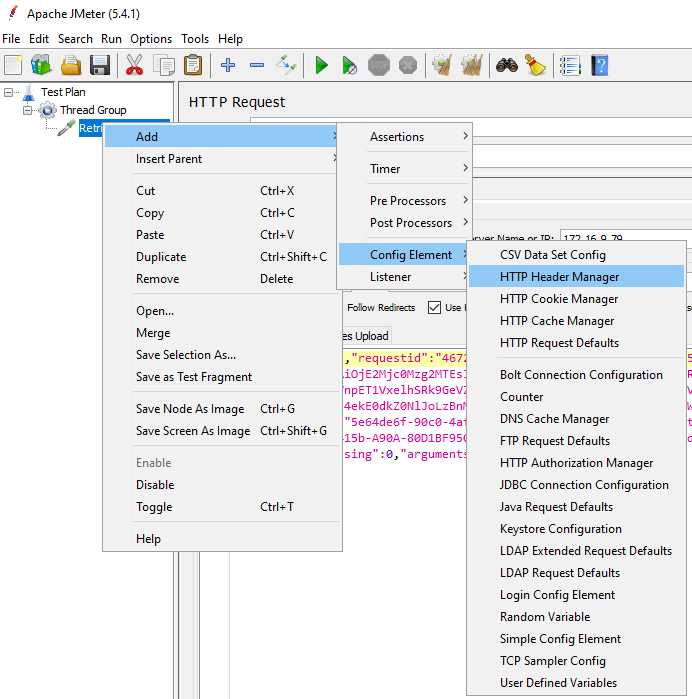
To add an HTTP header manager, right click on the HTTP
request that you added just now, and then select Add > Config
Element > HTTP Header
Manager.
When you specify the HTTP header, you can make use of the
information obtained by Fiddler.
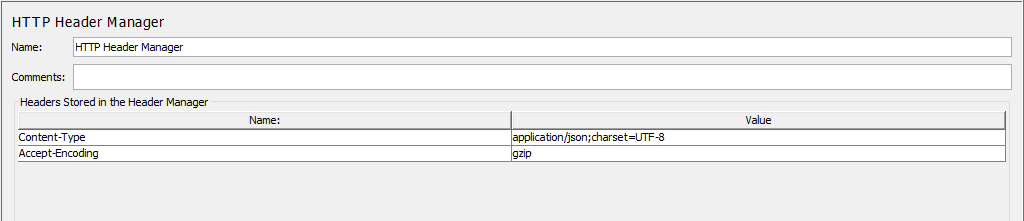
For example, you can add the Content-Type and Accept-Encoding to the HTTP header
manager.
If all requests will use the same header information, you
can use one HTTP Header Manager for all requests (or even for all
thread groups), instead of each request having its own HTTP Header
Manager. You can adjust the hierarchical level of the HTTP Header
Manager (by drag & drop) in Thread Group.