Setting up shared database
profiles
You set up shared database profiles in the Database Preferences
dialog box.
To set up shared database profiles:
-
In the Database painter, select Design>Options from the
menu bar to display the Database Preferences dialog box. -
In the Shared Database Profiles box on the General tab page,
specify the location of the file containing the database profiles
you want to share. Do this in either of the following ways:-
Type the location (path name) in the Shared Database
Profiles box. -
Click the Browse button to navigate to the file location
and display it in the Shared Database Profiles box.In the following example, c:workshare.ini is the
location of the file containing the database profiles to be
shared: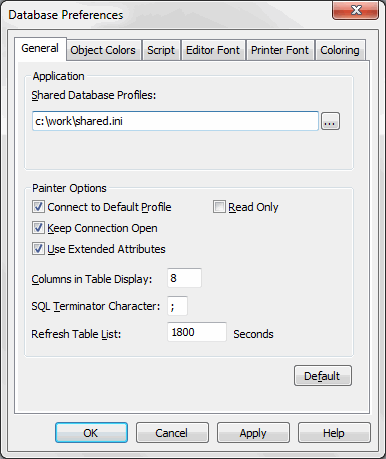
-
-
Click OK.
PowerBuilder applies the Shared Database Profiles setting to
the current connection and all future connections and saves the
setting in the registry.