PowerBuilder Installer blocked by Windows Defender
SmartScreen
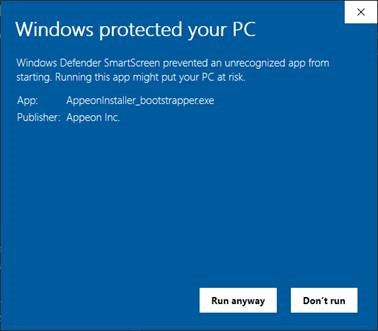
Phenomenon:
When you run PowerBuilder Installer in some environments,
Windows Defender SmartScreen shows a warning indicating that the
installer is an unrecognized app, or the anti-virus software displays
warnings like “This file might be dangerous”.
Cause:
Windows Defender SmartScreen and some anti-virus software
determine whether a file is potentially malicious by checking if the
file is well known and downloaded by many users, while PowerBuilder
Installer is available to the public not long ago.
Solution:
If Windows Defender SmartScreen or the anti-virus software
offers the “Run Anyway” option, you
should be safe to select this option to proceed with the installation,
because PowerBuilder Installer is digitally signed by “Appeon Inc.”
and is free of adware, spyware or any form of malware.
If PowerBuilder Installer has an established reputation and you
still see the warning, you may need to update the malware definitions
of Windows Defender SmartScreen or the anti-virus software on your
local machine. Take Windows Defender SmartScreen as an example, you
can update the definitions by the following steps:
-
Run the Command Prompt as administrator and change directory
to C:Program FilesWindows Defender -
In the command window, execute “MpCmdRun.exe
-removedefinitions -dynamicsignatures” -
In the command window, execute “MpCmdRun.exe
-SignatureUpdate”