Choosing a packaging model
As indicated in the previous section, you have many options for
packaging an executable version of an application. Here are several of
the most common packaging models you might consider.
A standalone executable
file
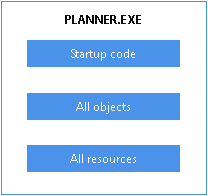
In this model, you include everything (all objects and resources)
in the executable file, so that there is just one file to
deliver.
Illustration
The following figure shows a sample of what this model can look
like.
Figure: Standalone executable model
Use
This model is good for small, simple applications — especially
those that are likely not to need a lot of maintenance. For such
projects, this model ensures the best performance and the easiest
delivery.
An executable file and external
resources
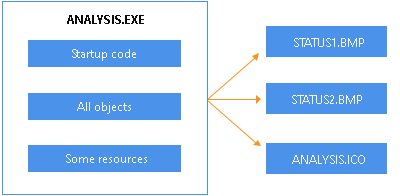
In this model, you include all objects and most resources in the
executable file, but you deliver separate files for particular
resources.
Illustration
The following figure shows a sample of what this model can look
like.
Figure: Executable with external resources model
Use
This model is also for small, simple applications, but it differs
from the preceding model in that it facilitates maintenance of resources
that are subject to change. In other words, it lets you give users
revised copies of specific resources without forcing you to deliver a
revised copy of the executable file.
You can also use this model to deal with resources that must be
shared by other applications or that are large and infrequently
needed.
An executable file and dynamic
libraries
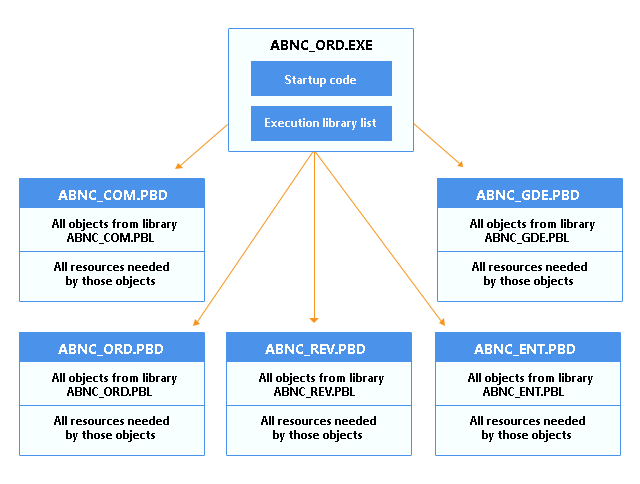
In this model, you split up your application into an executable
file and one or more dynamic library files (DLLs or PBDs). When doing
so, you can organize your objects and resources in various ways. The
following table shows some of these techniques.
|
To organize |
You can |
|---|---|
|
Objects |
Place them all in dynamic libraries so that there Place a few of the most frequently accessed ones |
|
Resources |
Place most or all of them in dynamic libraries Place most or all of them in the executable file |
Illustration
The following figure shows a sample of what this model can look
like.
Figure: Executable with dynamic libraries model
Use
This model is good for most substantial projects because it gives
you flexibility in organizing and maintaining your applications. For
instance, it enables you to make revisions to a particular part of an
application in one dynamic library.
Note
Whenever you revise an application, Appeon recommends that you
always perform a full rebuild and distribute the executable file and
all the application’s dynamic libraries. For example, changes to any
of the following objects might affect other objects:
-
Property names and types
-
Function names
-
Function arguments and return values
-
The sequence of functions or properties in objects or
groups -
Anything that might affect inherited objects in other
PBLs
An executable file, dynamic libraries, and
external resources
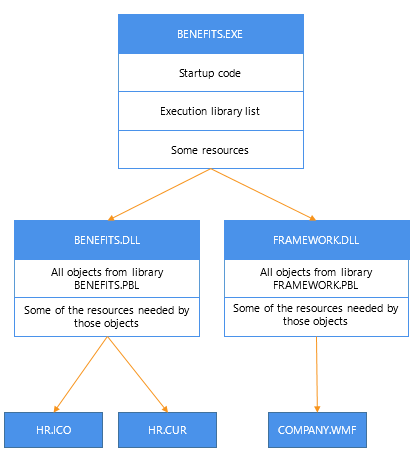
This model is just like the preceding one except that you deliver
separate files for particular resources (instead of including all of
them in your executable file and dynamic libraries).
Illustration
The following figure shows a sample of what this model can look
like.
Figure: Executable with dynamic libraries and external resources
model
Use
This model is good for substantial applications, particularly
those that call for flexibility in handling certain resources. Such
flexibility may be needed if a resource:
-
Might have to be revised
-
Must be shared by other applications
-
Is large and infrequently used