Step 2: declare the stored procedure as an external
function
FUNCTION or SUBROUTINE
declaration
You can declare a non-result-set database stored procedure as an
external function or external subroutine in a PowerBuilder application.
If the stored procedure has a return value, declare it as a function
(using the FUNCTION keyword). If the stored procedure returns nothing or
returns VOID, declare it as a subroutine (using the SUBROUTINE
keyword).
RPCFUNC and ALIAS FOR
keywords
You must use the RPCFUNC keyword in the function or subroutine
declaration to indicate that this is a remote procedure call (RPC) for a
database stored procedure rather than for an external function in a
dynamic library. Optionally, you can use the ALIAS FOR
“spname” expression to supply the name of the stored procedure as it
appears in the database if this name differs from the one you want to
use in your script.
For complete information about the syntax for declaring stored
procedures as remote procedure calls, see the section called “Calling Functions and Events” in PowerScript Reference.
To declare stored procedures as external functions for the user
object:
-
In the Script view in the User Object painter, select
[Declare] from the first list and Local External Functions from the
second list. -
Place your cursor in the Declare Local External Functions
view. From the pop-up menu or the Edit menu, select Paste
Special>SQL>Remote Stored Procedures.PowerBuilder loads the stored procedures from your database
and displays the Remote Stored Procedures dialog box. It lists the
names of stored procedures in the current database.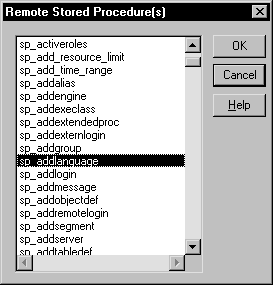
-
Select the names of one or more stored procedures that you
want to declare as functions for the user object, and click
OK.PowerBuilder retrieves the stored procedure declarations from
the database and pastes each declaration into the view.For example, here is the declaration that displays on one line
when you select sp_addlanguage:12function long sp_addlanguage()RPCFUNC ALIAS FOR "dbo.sp_addlanguage" -
Edit the stored procedure declaration as needed for your
application.Use either of the following syntax formats to declare the
database remote procedure call (RPC) as an external function or
external subroutine (for details about the syntax, see the section called “Declaring DBMS stored procedures as remote procedure
calls” in PowerScript Reference):12345FUNCTION rtndatatype functionname ( { { REF } datatype1 arg1, ...,{ REF } datatypen argn } ) RPCFUNC { ALIAS FOR "spname" }SUBROUTINE functionname ( { { REF } datatype1 arg1 , ...,{ REF } datatypen argn } ) RPCFUNC { ALIAS FOR "spname" }Here is the edited RPC function declaration for
sp_addlanguage:12FUNCTION long sp_addlanguage()RPCFUNC ALIAS FOR "addlanguage_proc"