Identifying the window as the basis
of a style
In order for InfoMaker to recognize that a window in a library
serves as the basis for a form style, you must specify a comment for the
window that starts with the text Style:
|
1 |
Style: text that describes the style |
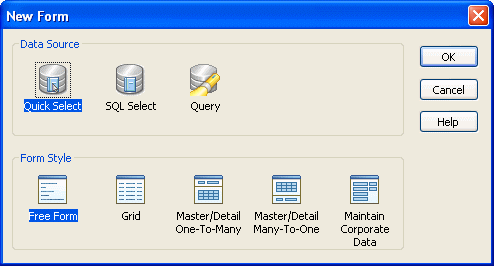
The text that follows Style: is the text that displays below the
icon for the form style in the New Form dialog box in InfoMaker.
For example, if you save a w_pbstyle_freeform window with the
comment Style: Maintain corporate data in a style library, InfoMaker
users see this when they create a new form:
You can specify the comment either when first saving the window or
in the Library painter.
For more information about designing windows, see the section called “Working with Windows” in Users Guide.
Document get from Powerbuilder help
Thank you for watching.
Subscribe
Login
0 Comments
Oldest