Modifying properties when designing
You define the appearance and behavior of controls in DataWindow
objects in the DataWindow painter. As you do that, you are specifying
the controls’ properties. For example, when you place a border around
a column, you are setting that column’s Border property.
In most cases, the appearance and behavior of controls is fixed;
you do not want them to change at runtime. When you make headings bold
when designing them, you want them to be bold at all times.
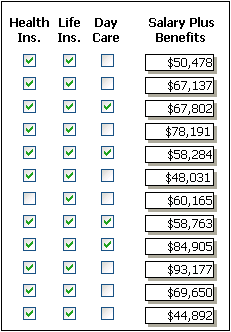
In the following DataWindow object, the Salary Plus Benefits
column has a Shadow box border around every data value in the column.
To display the border, you set the border property for the
column:
Document get from Powerbuilder help
Thank you for watching.
Subscribe
Login
0 Comments
Oldest