Event ID names
The PowerBuilder naming convention for user event IDs is
similar to the convention Windows uses to name messages. All
PowerBuilder event IDs begin with pbm_.
Event IDs associated with Windows
messages
Several Windows messages and notifications map to PowerBuilder
event IDs.
For Windows messages that begin with wm_, the PowerBuilder
event ID typically has the same name with pbm_ substituted for wm_.
For messages from controls, the PowerBuilder event ID typically has
the same name but begins with pbm_ and has the Windows prefix for
the control added to the message name. For example:
-
wm_keydown maps to pbm_keydown
-
bm_getcheck (a button control message) maps to
pbm_bmgetcheck -
bn_clicked (a button control notification message) maps to
pbm_bnclicked
To see a list of event IDs to which you can map a user-defined
event, select Insert>Event and display the Event ID drop-down
list in the Prototype window that displays.
Windows messages that are not mapped to a PowerBuilder event
ID map to the pbm_other event ID. The PowerBuilder Message object is
populated with information about system events that are not mapped
to PowerBuilder event IDs. For more information about the Message
object, see the section called “Message object” in Objects and Controls or the section called “The
Message object” in Application Techniques.
For more information about Windows messages and notifications,
see the information about Windows controls and Windows management in
the section on user interface design and development in the
Microsoft MSDN Library at http://msdn.microsoft.com/library/default.aspx.
Event IDs associated with PowerBuilder
events
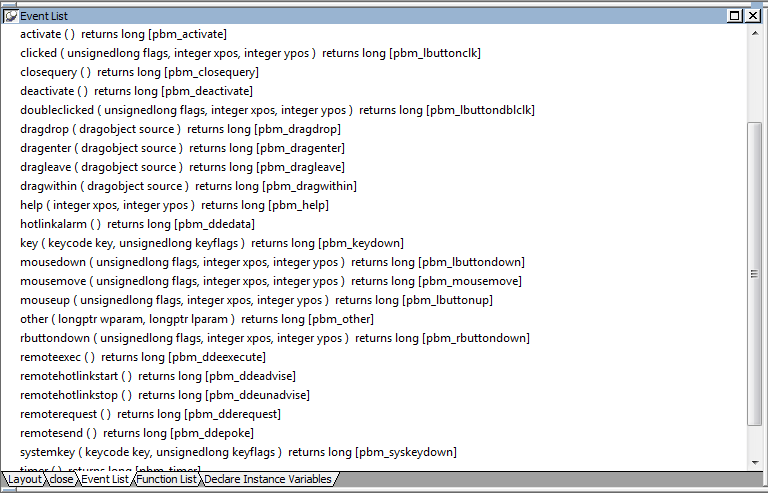
PowerBuilder has its own events, each of which has an event
ID. For example, the PowerBuilder event DragDrop has the event ID
pbm_dragdrop. The event name and event ID of the predefined
PowerBuilder events are protected; they cannot be modified. The
event IDs for predefined events are shown in the Event List
view:
Custom event IDs
The list of event IDs that displays in the Event ID drop-down
list in the Prototype window includes custom event IDs. Custom user
events can be mapped from Windows wm_user message numbers to
pbm_customxx event IDs.
Obsolete technique
This technique is not recommended and is considered to be
obsolete. The ability to use this technique has been retained for
backward compatibility. If you do not want to map a user event to
a named pbm_ code, use an unmapped user event as described in
Unmapped user events.
These event IDs were intended for use with DataWindow
controls, windows, and user objects other than standard visual user
objects, which behave like the built-in controls they inherit from.
They were not intended for use with standard controls.
Defining custom user events for standard controls can cause
unexpected behavior because all standard controls respond to
standard events in the range 0 to 1023. Most controls also define
their own range of custom events beyond 1023, corresponding to
wm_user messages, and some controls have custom events that overlap
with the PowerBuilder custom events. The pbm_custom01 event ID maps
to wm_user+0, pbm_custom02 maps to wm_user+1, and so on, through
pbm_custom75, which maps to wm_user+74.