Example 2: counting active and terminated employees
Example 1 demonstrates the use of the Sum and Count functions.
Sum and Count are two examples of a class of functions called aggregate
functions.
An aggregate function is a function that operates on a range of
values in a column. The aggregate functions are:
|
Avg |
Large |
Mode |
Sum |
|
Count |
Last |
Percent |
Var |
|
CumulativePercent |
Max |
Small |
VarP |
|
CumulativeSum |
Median |
StDev |
|
|
First |
Min |
StDevP |
|
About crosstab functions
Although the crosstab functions (CrosstabAvg,
CrosstabAvgDec, CrosstabCount, CrosstabMax, CrosstabMaxDec,
CrosstabMin, CrosstabMinDec, CrosstabSum, and CrosstabSumDec) behave
like aggregate functions, they are not included on the list because
they are for crosstabs only and are designed to work in the crosstab
matrix.
A few restrictions apply to the use of aggregate functions. You
cannot use an aggregate function:
-
In a filter
-
In a validation rule
-
As an argument for another aggregate function
This example demonstrates the use of the Sum aggregate
function.
What you want to do
Using the employee table in the PB Demo DB as the data source, you
create a DataWindow object using at least the Emp_id and the Status
columns. You want the DataWindow object to display the number of active
employees, terminated employees, and on leave employees in the
company.
How to do it
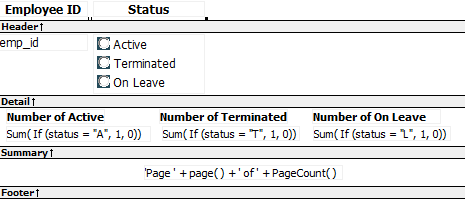
In the summary band in the workspace, add three computed fields to
the DataWindow object that use the Sum and If functions:
|
1 |
Sum(If(status = "A", 1, 0)) |
counts the number of Active employees in your company;
|
1 |
Sum(If(status = "T", 1, 0)) |
counts the number of Terminated employees in your company;
|
1 |
Sum(If(status = "L",1,0)) |
counts the number of On Leave employees in your company.
By clicking the Page computed field button, you can also add a
Page computed field in the footer band to display the page number and
total pages at the bottom of each page of the DataWindow object.
What you get
Here is what the design of the DataWindow object looks
like.
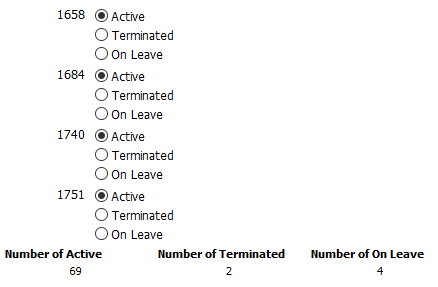
Here is the last page of the DataWindow object, with the total
number of active employees, terminated employees, and on leave employees
in the company displayed.
If you want more
information
What if you decide that you also want to know the number of active
employees, terminated employees, and on leave employees in each
department in the company?
To display the active employees, terminated employees, and on
leave employees in each department:
-
Select Design>Data Source from the menu bar so that you can
edit the data source. -
Select Design>Select tables from the menu bar and open the
Department table in the Select painter workspace, which currently
displays the Employee table with the Emp_id and Status columns
selected. -
Select the department_dept_name column to add it to your data
source. -
Select Rows>Create Group from the menu bar to create a
group and group by department name. -
In the trailer group band, add three additional computed
fields:1Sum(If(status = "A", 1, 0) for group 1)counts the number of active employees in each
department;1Sum(If(status = "T", 1, 0) for group 1)counts the number of terminated employees in each
department;1Sum(If(status = "L", 1, 0) for group 1)counts the number of on leave employees in each
department.Here is what the design of the grouped DataWindow object looks
like.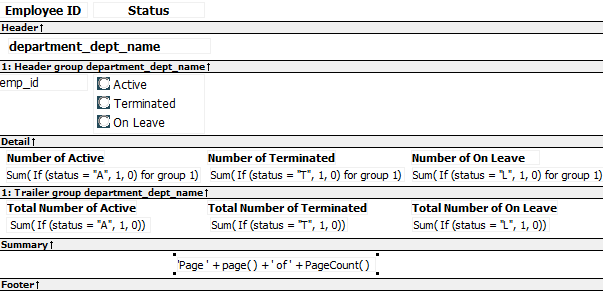
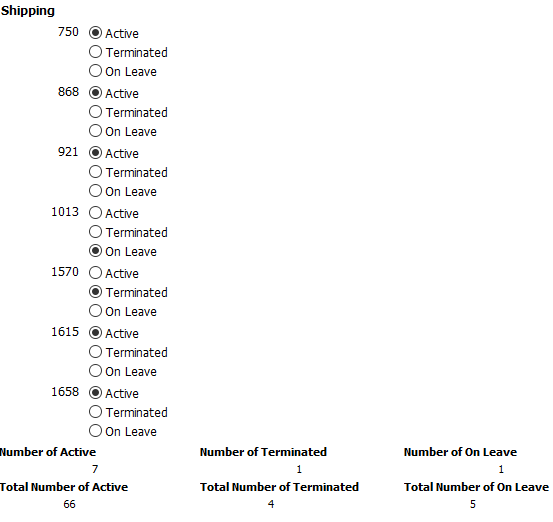
Here is the last page of the DataWindow object with the number
of active employees, terminated employees, and on leave employees in
the shipping department displayed, followed by the total number of
active employees, terminated employees, and on leave employees in
the company.